
Automate Syncro Ticket Creation & Updates from Dialpad Calls
Automate Syncro ticket management for all inbound Dialpad calls, reducing manual data entry by 100% and accelerating response times.


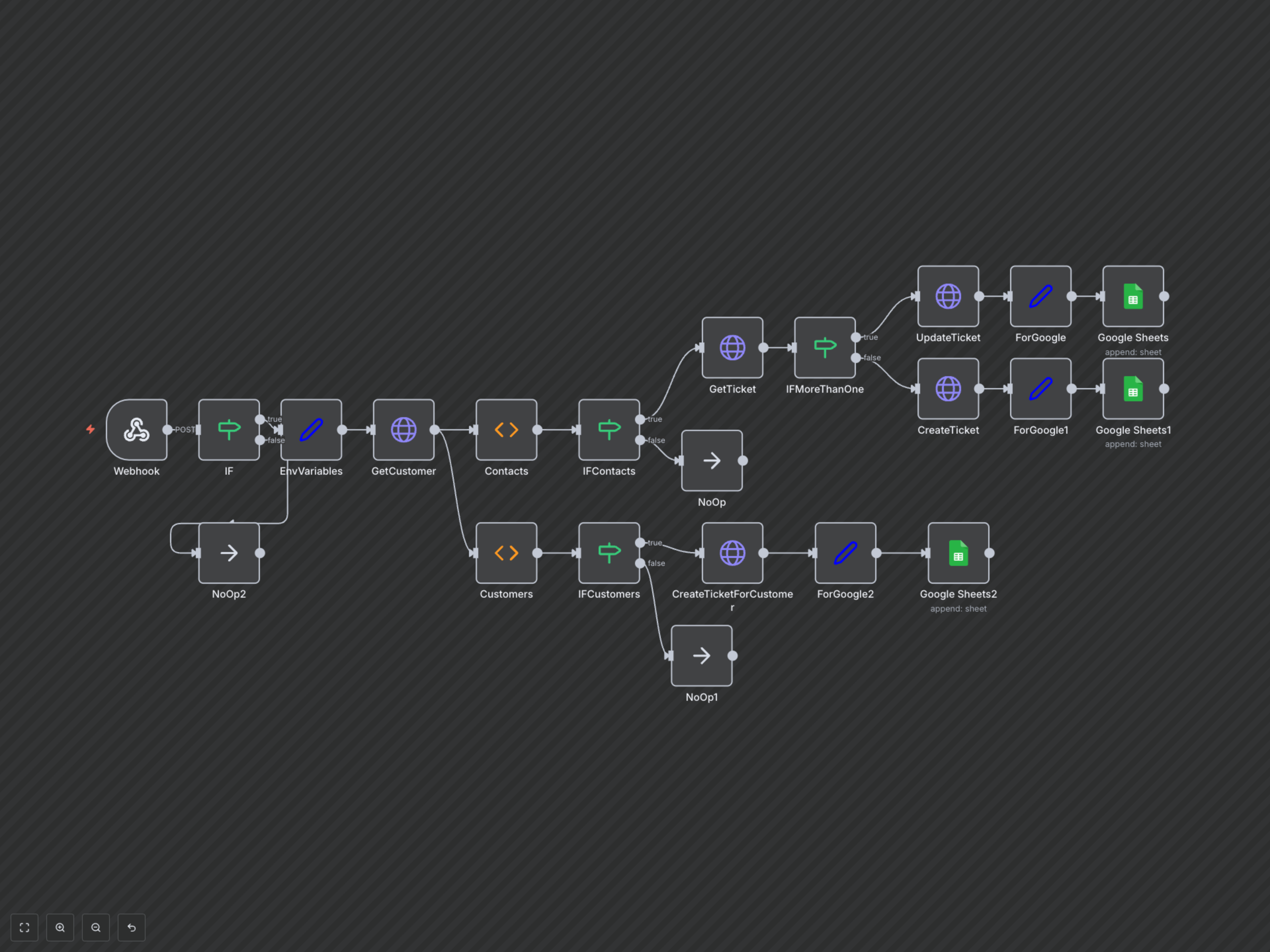
Manual creation or updating of support tickets for every inbound phone call consumes valuable time and can lead to missed customer interactions. This workflow instantly creates or updates Syncro tickets for inbound Dialpad calls, ensuring every customer interaction is logged and streamlining your support process.
Dialpad to Syncro Ticket Automation
This robust n8n workflow seamlessly integrates Dialpad and Syncro, automating the creation and updating of support tickets for every inbound phone call. It's ideal for MSPs and support teams aiming to eliminate manual data entry, improve response times, and ensure comprehensive tracking of customer interactions within Syncro.
Key Features
- Automatically creates new Syncro tickets for unknown contacts or customers, ensuring no call goes unrecorded.
- Updates existing open Syncro tickets by adding call comments for known contacts, maintaining a complete communication history.
- Intelligent caller identification to link calls to the correct Syncro contact or customer record.
- Logs all Dialpad call and Syncro ticket creation/update events to a Google Sheet for comprehensive audit trails and reporting.
- Boosts support team efficiency by automating routine ticket management tasks.
How It Works
When an inbound call is received by Dialpad, this workflow is triggered via a webhook. It first retrieves customer and contact information from Syncro based on the caller's phone number, after standardizing the number format. If a contact is found, the workflow checks for any existing open tickets associated with that contact. If an open ticket exists, a detailed comment about the inbound call is added to it. If no open ticket is found, a new ticket is automatically created for the contact. In cases where no specific contact is identified but a matching customer record is found, a new ticket is created directly for that customer. Finally, critical details like the Dialpad call ID and the associated Syncro ticket ID are meticulously logged in a designated Google Sheet, ensuring a complete and searchable record of every customer interaction.