
Automate Personalized WhatsApp Messaging & KlickTipp Subscriber Management
Achieve higher engagement rates and streamline subscriber management, reducing manual communication effort by up to 70%.

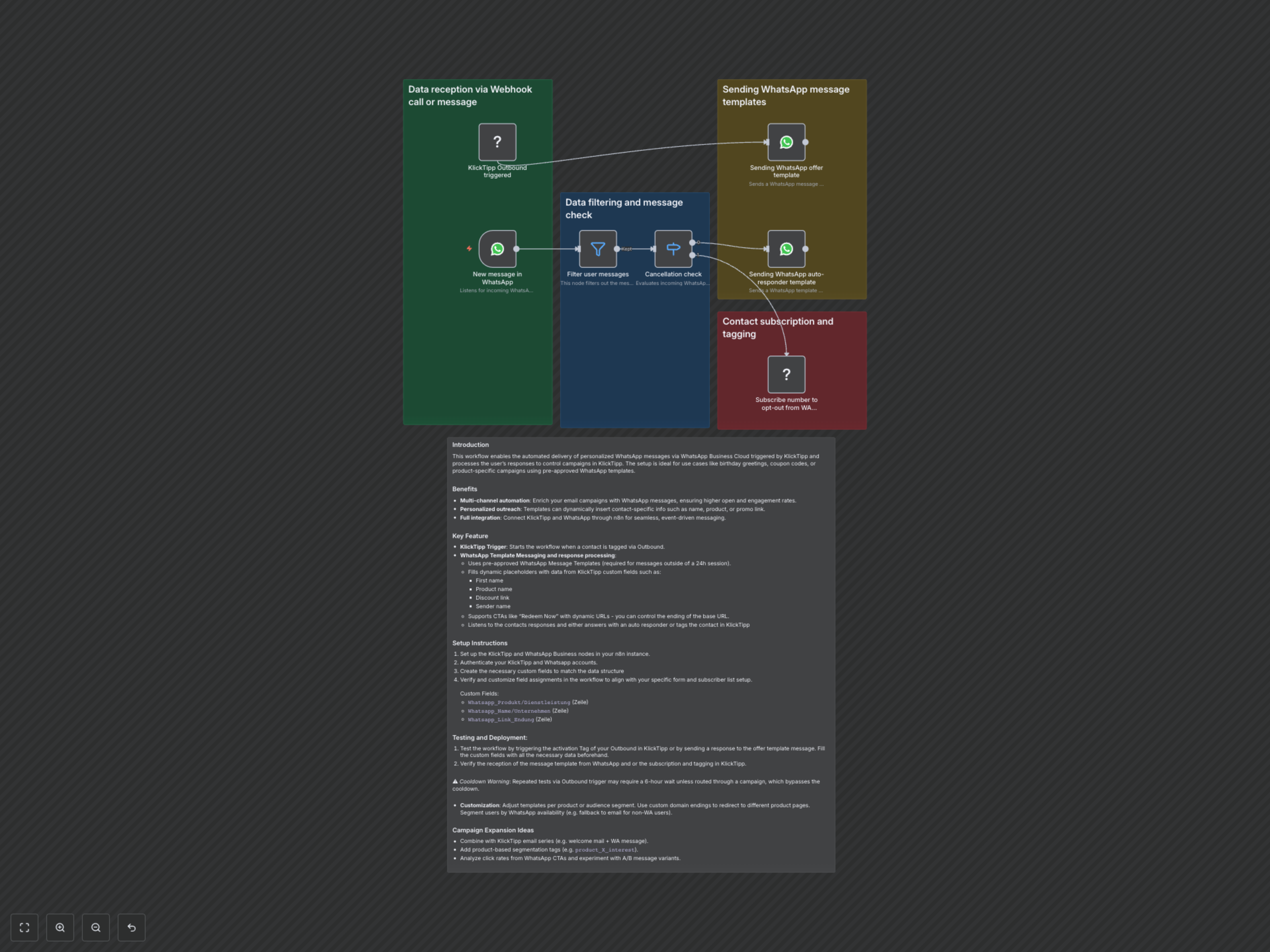
Manually managing multi-channel communication and campaign responses is time-consuming and prone to errors. This workflow automates personalized WhatsApp message delivery triggered by KlickTipp events and intelligently processes user responses, streamlining subscriber management and support routing.
Automate Personalized WhatsApp Messaging & KlickTipp Subscriber Management
This workflow enables the automated delivery of personalized WhatsApp messages via WhatsApp Business Cloud triggered by KlickTipp and processes user responses to control campaigns in KlickTipp. It's ideal for use cases like birthday greetings, coupon codes, or product-specific campaigns using pre-approved WhatsApp templates.
Key Features
- Multi-channel automation: Enrich your email campaigns with WhatsApp messages, ensuring higher open and engagement rates.
- Personalized outreach: Templates dynamically insert contact-specific information such as name, product, or promotional links.
- Full integration: Seamlessly connect KlickTipp and WhatsApp through n8n for event-driven messaging and subscriber control.
- KlickTipp Trigger: Initiate WhatsApp messages when a contact is tagged or an event occurs via KlickTipp Outbound.
- WhatsApp Template Messaging and Response Processing: Utilize pre-approved WhatsApp Message Templates, fill dynamic placeholders with KlickTipp custom field data, support interactive CTAs, and process user responses to either send an auto-responder or tag the contact in KlickTipp for opt-out.
How It Works
This workflow operates through two primary flows, enabling proactive outreach and intelligent response handling:
- KlickTipp Initiated Messaging: An event in KlickTipp (e.g., tagging a contact via Outbound) triggers the workflow. Subscriber data, including custom fields for first name, product, and a dynamic link, is pulled from KlickTipp. This information is then used to personalize and send a pre-approved WhatsApp offer template (e.g., offer_for_manual) to the contact's WhatsApp number.
- WhatsApp Inbound Response Processing:
- Receive & Filter: The workflow actively listens for incoming WhatsApp messages and filters out automated responses to ensure genuine user interaction.
- Cancellation Check: Incoming messages are processed to detect if they begin with the keyword "STOP" (case and whitespace insensitive).
- Opt-Out Scenario: If "STOP" is detected, the sender's WhatsApp number is subscribed to a designated opt-out list in KlickTipp, automatically managing unsubscriptions.
- General Inquiry/Support Scenario: If the message does not contain "STOP", an automated WhatsApp template (e.g., auto_forward_to_support) is sent back, acknowledging the message and indicating it will be forwarded for support.