
Automate Web Search with GPT-4o Chatbot for Instant Answers
Provide instant, accurate web search answers to user queries, reducing manual research time by up to 90% and improving user satisfaction.


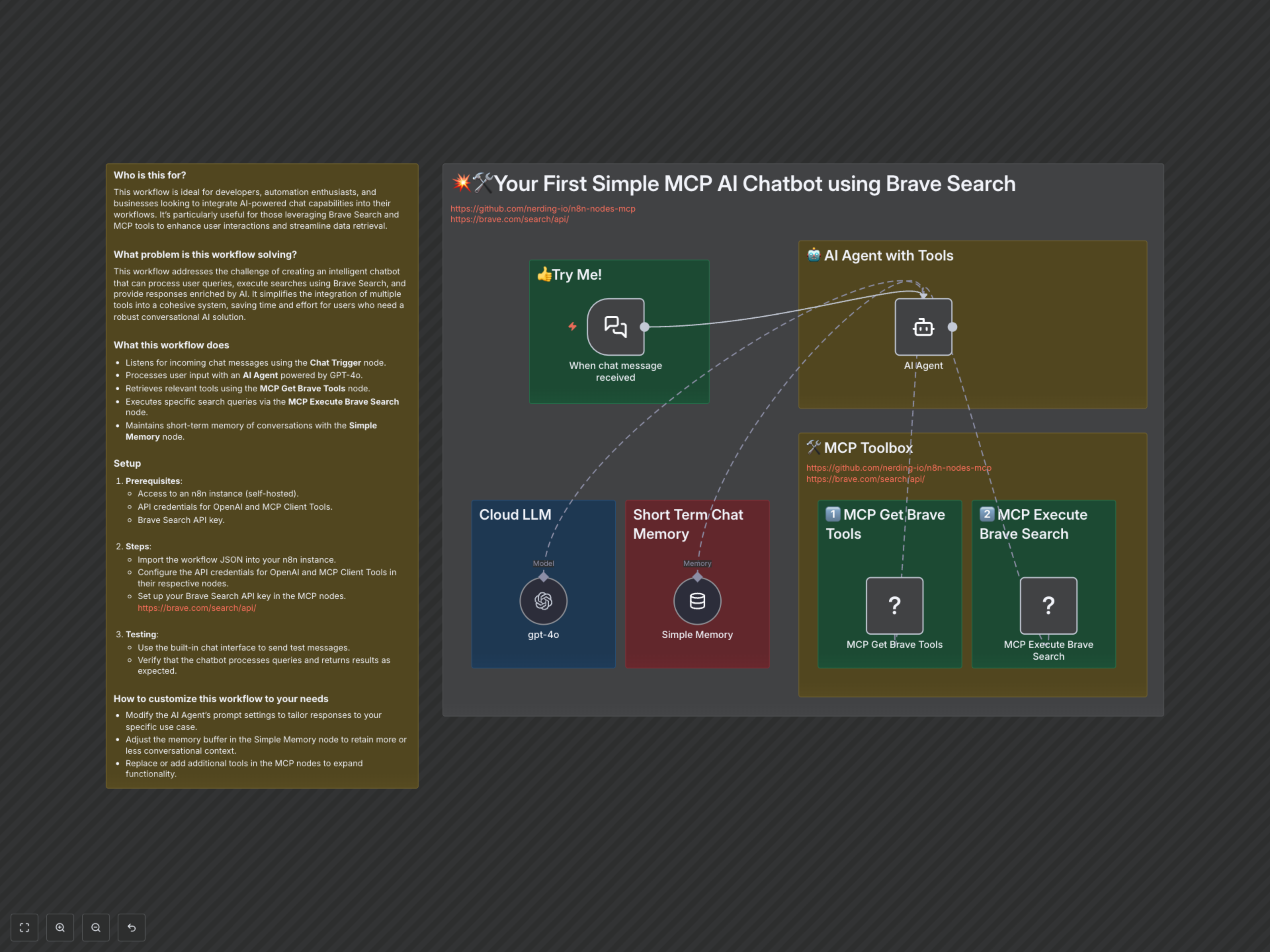
Manual web search and synthesizing information for chat responses is time-consuming and inefficient. This workflow builds an AI-powered chatbot using GPT-4o and Brave Search, instantly delivering accurate, real-time web search results to user queries.
Build an Advanced Web Search Chatbot with GPT-4o and Brave Search
This n8n workflow empowers developers, automation enthusiasts, and businesses to deploy a sophisticated AI chatbot capable of real-time web search. It streamlines information retrieval by combining the conversational intelligence of GPT-4o with the powerful, privacy-focused search capabilities of Brave Search, delivering instant and accurate answers to user queries.
Key Features
- Instant Chat Response: Automatically listens for incoming chat messages and initiates a conversational flow.
- Intelligent AI Agent: Leverages GPT-4o for advanced natural language understanding and dynamic decision-making.
- Real-Time Web Search: Integrates with Brave Search via MCP tools to access and retrieve up-to-the-minute information from the web.
- Contextual Conversations: Maintains short-term memory to ensure fluid and contextually relevant chat interactions.
- Automated Tool Use: Empowers the AI to autonomously select and execute external tools like Brave Search when necessary.
How It Works
When a user sends a chat message, the 'When chat message received' node acts as the entry point, triggering the workflow. This message is then routed to the 'AI Agent', which is powered by the 'gpt-4o' language model and maintains conversational context through the 'Simple Memory' node. The AI Agent intelligently determines if a web search is required to answer the user's query. If so, it dynamically calls upon the 'MCP Get Brave Tools' to identify available search functions and then uses 'MCP Execute Brave Search' to perform a targeted web search. The retrieved results are then processed by the AI Agent to formulate an accurate and comprehensive response, which is sent back to the user via the chat interface.
Customization Opportunities
- Tailor AI Agent Prompts: Modify the 'AI Agent's prompt settings to align responses with your specific brand voice, domain, or use case.
- Adjust Memory Retention: Configure the 'Simple Memory' node's buffer to control how much conversational context the chatbot retains, optimizing for either short, focused interactions or longer, multi-turn dialogues.
- Expand Toolset: Integrate additional MCP tools or other n8n nodes to expand the chatbot's capabilities beyond web search, such as data retrieval from databases or CRM systems.
- Swap LLM: Easily switch the 'gpt-4o' node with other compatible Language Models available in n8n to experiment with different AI capabilities.