
Automate Shopify Customer Sync to Google Sheets & Squarespace
Automate Shopify customer data sync to Google Sheets and Squarespace, cutting manual export and formatting time by over 80%.

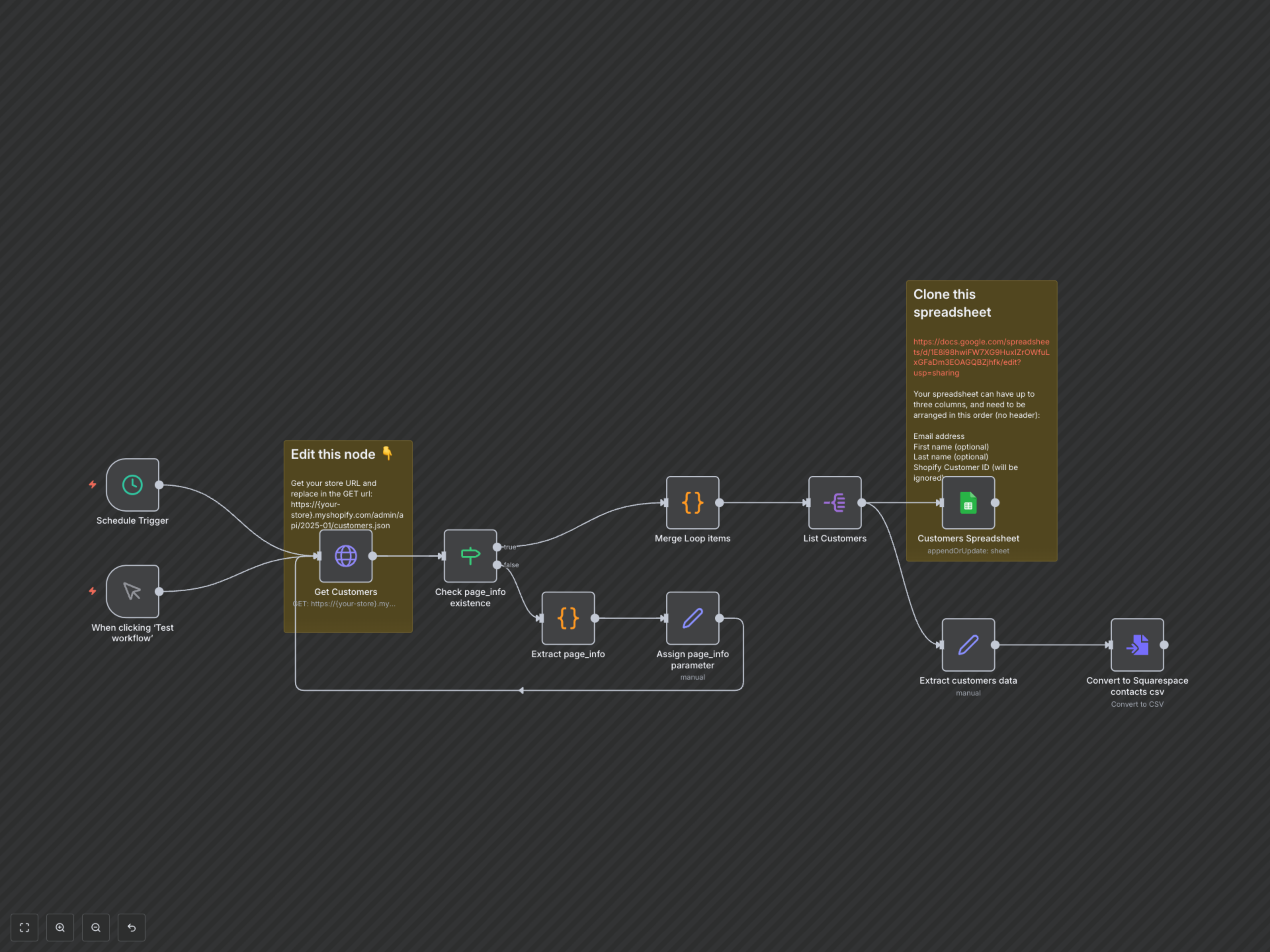
Manually exporting and syncing Shopify customer data across platforms is time-consuming and prone to errors. This workflow automatically extracts all customer information from Shopify, maintains an up-to-date Google Sheet, and generates a Squarespace-ready CSV for effortless contact management.
Automate Shopify Customer Sync to Google Sheets & Squarespace
This workflow is designed to streamline your customer data management by automating the synchronization of your Shopify customer base with Google Sheets and preparing it for seamless import into Squarespace contacts. Eliminate manual exports, reduce errors, and ensure your contact lists are always current.
Key Features
- Automatically retrieves all Shopify customer data using efficient pagination handling, ensuring no customer records are missed.
- Seamlessly syncs customer details, including ID, email, first name, and last name, to a designated Google Sheet, keeping your records updated.
- Generates a CSV file specifically formatted for direct import into Squarespace contacts, simplifying your contact list migration.
- Configurable scheduling options to automate data synchronization, maintaining continuous accuracy without manual intervention.
How It Works
This workflow initiates either on a scheduled basis or manually. It connects to your Shopify store via an HTTP Request node to fetch customer records. A robust pagination loop, managed by 'Check page_info existence' and 'Extract page_info' nodes, ensures all customer pages are retrieved. The 'Merge Loop items' node consolidates all collected customer data. This aggregated data is then processed: first, it is split into individual customer items by 'List Customers', then appended or updated in a Google Sheet through the 'Customers Spreadsheet' node. Finally, the 'Extract customers data' and 'Convert to Squarespace contacts csv' nodes format the information into a clean CSV file, ready for direct import into Squarespace contacts.