
How to Scale a 6-Figure Automation Agency Using n8n (The 2026 Blueprint)
If you run an automation agency, a freelance consultancy, or even a side-hustle helping businesses integrate their tools, you are likely heavily reliant on the “Big Two” iPaaS platforms: Zapier and Make (formerly Integromat).
And if you are honest with yourself, you are probably facing a wall.
The Problem: You are trapped in the “Service Trap.” You are trading hours for dollars. You build a workflow, get paid once, and then move on to the next client. Worst of all, your clients are paying a “Success Tax” to Zapier. The more successful your automation is, the higher their bill climbs.
The Agitation: This model is fundamentally broken for scaling a profit-first agency. You are acting as a “Digital Janitor”—cleaning up data pipelines for an hourly wage—while the software vendors capture all the recurring value. You build the fast car (the complex workflow), but the toll roads (Zapier task costs) make it prohibitively expensive for your clients to drive it at scale.
The Solution: The top 1% of agencies in 2026 have shifted their mindset. They aren’t selling “time” or “setup fees”; they are selling “Digital Workers” hosted on their own infrastructure. They use n8n.
By switching to n8n, you can decouple the value you provide from the cost of execution. You can charge premium retainers while your costs remain flat. This guide is your blueprint to escaping the hourly rat race and building an automation empire that scales.
1. The “Zapier Tax”: Why It Kills Agency Margins
The Context: The Hidden Cost of Success
When you start an agency, simplicity is key. Zapier is easy. You can set up a “Lead -> CRM” flow in 5 minutes. But as you move upmarket to serve serious SMEs (Small to Medium Enterprises), the math starts to break down.
Clients don’t care about “Tasks” or “Operations.” They care about Outcomes. They want “Leads Processed” or “Invoices Sent.”
However, traditional automation platforms charge based on activity.
- The Scenario: You land a logistics client who needs to track 10,000 shipments a month. Each shipment requires 5 steps (Check status, Update DB, Email Customer, SMS Driver, Update Dashboard).
- The usage: 50,000 tasks/month.
- The Bill: On Zapier, this single client is looking at ~$300-$500/month just for the software.
The Problem: Friction and Margin Compression
This creates two massive problems for your agency:
- Friction: You have to continually justify “software costs” to the client. “Why did my bill go up? I thought I paid you to fix this?”
- Margin Compression: If the client has a $1,000/month budget for automation, and Zapier takes $500, you only get $500. You are splitting your revenue 50/50 with a vendor that doesn’t know your client exists.
The Automation Arbitrage
n8n changes the fundamental economics of your agency because it is Source-Available and Self-Hostable.
- Your Cost: You can host an n8n instance on a robust Virtual Private Server (VPS) like Hetzner or DigitalOcean for ~$20 - $40 per month.
- Your Capacity: That $40 server can easily handle hundreds of thousands, if not millions, of executions per month.
- The Profit: You can host unlimited workflows for unlimited clients on that single $40 box.
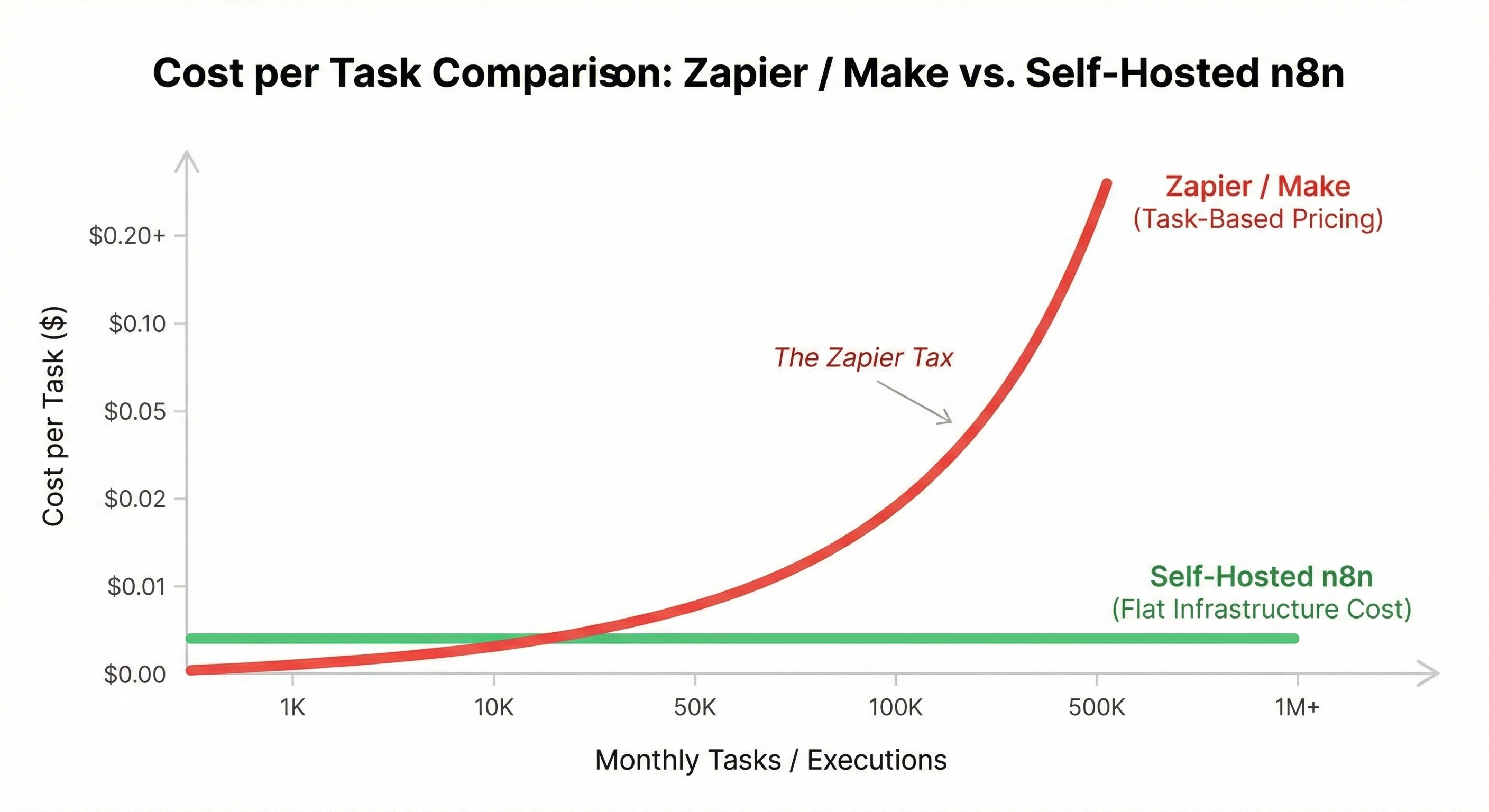
If you charge that logistics client $500/month for “Managed Automation Infrastructure,” your cost is negligible (cents). Your profit margin jumps from 0% (on the software reselling) to ~99%. You have effectively captured the “Zapier Tax” for yourself.
Common Pitfalls
- Under-provisioning: Don’t be too cheap. Use a VPS with at least 4GB of RAM (approx $20/mo) to ensure stability. A $5 droplet might crash if a client sends a big CSV.
- Single Point of Failure: If you put 50 clients on one server and it goes down, you have 50 angry phone calls. (We will cover architecture later).
2. Business Model 1: The “White-Label” Retainer
The Context: Recurring Revenue is King
Project revenue feeds you today; recurring revenue feeds you forever. The holy grail of any agency is the Retainer. But clients hate paying retainers for “maintenance” if they don’t see active work being done.
The “White-Label” model solves this by bundling the hosting and the maintenance into a single, indispensable utility bill.
The Build: “Operations-as-a-Service”
Instead of saying, “I will set up Zapier for you,” you say, “I will provide the Growth Infrastructure for your business.”
- Infrastructure Setup:
- Deploy n8n on a sub-domain that reflects your agency or the service (e.g.,
core.agency-name.comorapp.client-name.com). - Use n8n’s branding features (available in enterprise or custom builds, or simply keep the backend hidden) to make the experience feel premium.
- Deploy n8n on a sub-domain that reflects your agency or the service (e.g.,
- The “Webhook Transformation”:
- Don’t ask the client for their login details to every tool if you can avoid it.
- Give them Webhooks. “Point your Typeform to this URL.”
- You control the “Black Box” that processes the data.
- The Contract:
- Structure the deal as a “SLA” (Service Level Agreement).
- Includes: Hosting, Monitoring, Bug Fixes, and small tweaks.
- Excludes: Brand new comprehensive workflows (those are upsells).
Pro Tip: The “Client Dashboard”
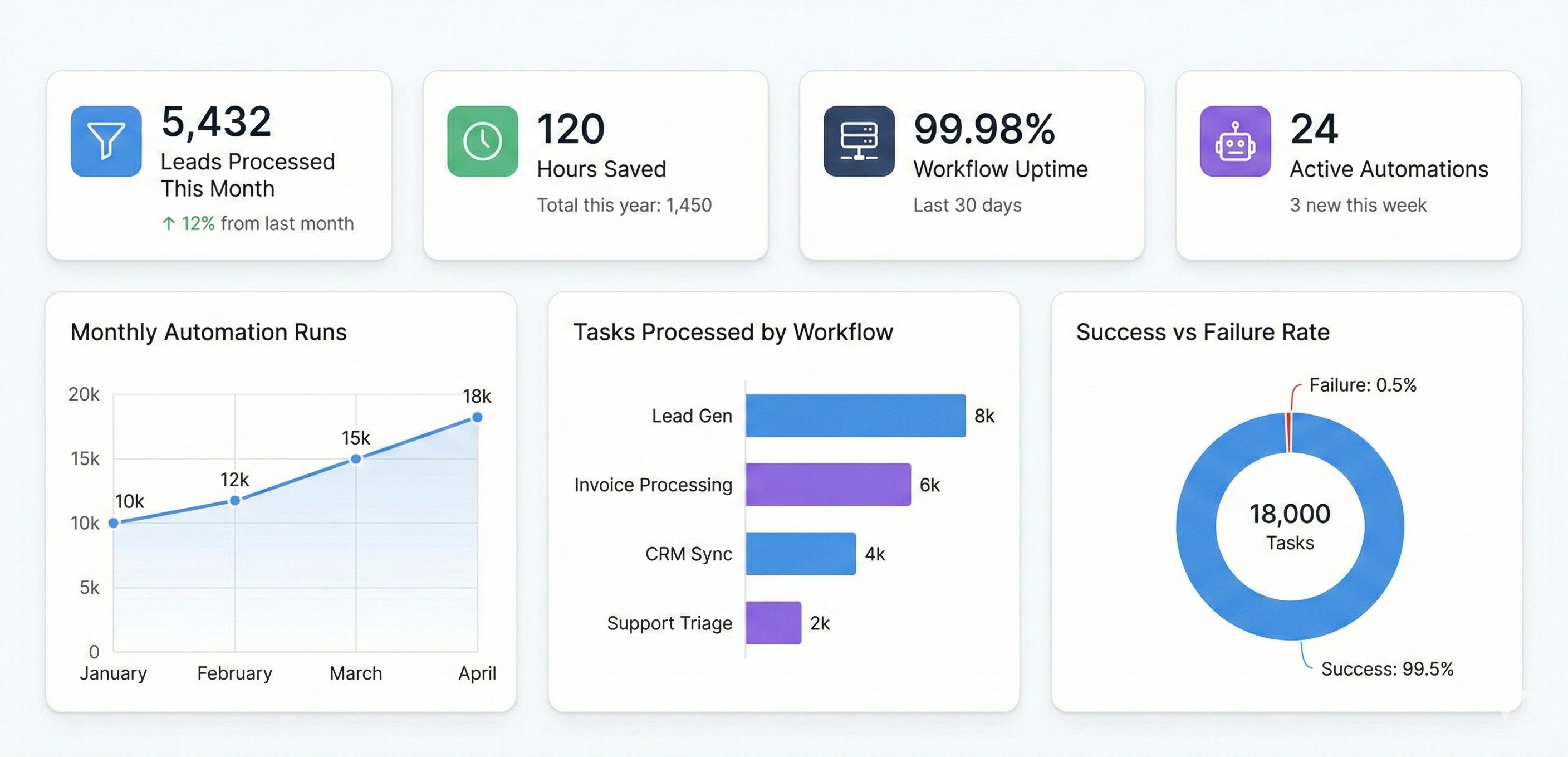
Use a no-code frontend tool like Softr or Glide, or even a simple streamlined Google Data Studio board, to visualize the work.
- Connect n8n to a Postgres database or Google Sheet.
- Every time a workflow runs successfully, write a log entry.
- Show the client a dashboard: “5,432 Leads Processed this Month. 120 Hours Saved.”
- This makes the retainer feel incredibly cheap compared to the value delivered.
Common Pitfalls
- IP Ownership: Be clear in your contract. If they cancel, do they keep the workflows?
- Recommendation: If you are hosting it, you own the engine. They own the data. If they leave, you can give them a JSON export, but they have to figure out how to run it. This creates high switching costs and reduces churn.
3. Business Model 2: Productized Services (Build Once, Sell Twice)
The Context: Escaping Custom Development Hell
Custom development is exhausting. Every client has a different CRM, a different naming convention, and a different “weird” requirement. This lack of standardization limits your ability to scale.
Productized Services are about finding a problem that 1,000 businesses have, solving it once perfectly, and selling that solution 1,000 times. n8n is the perfect engine for this because of its copy-paste nature (JSON).
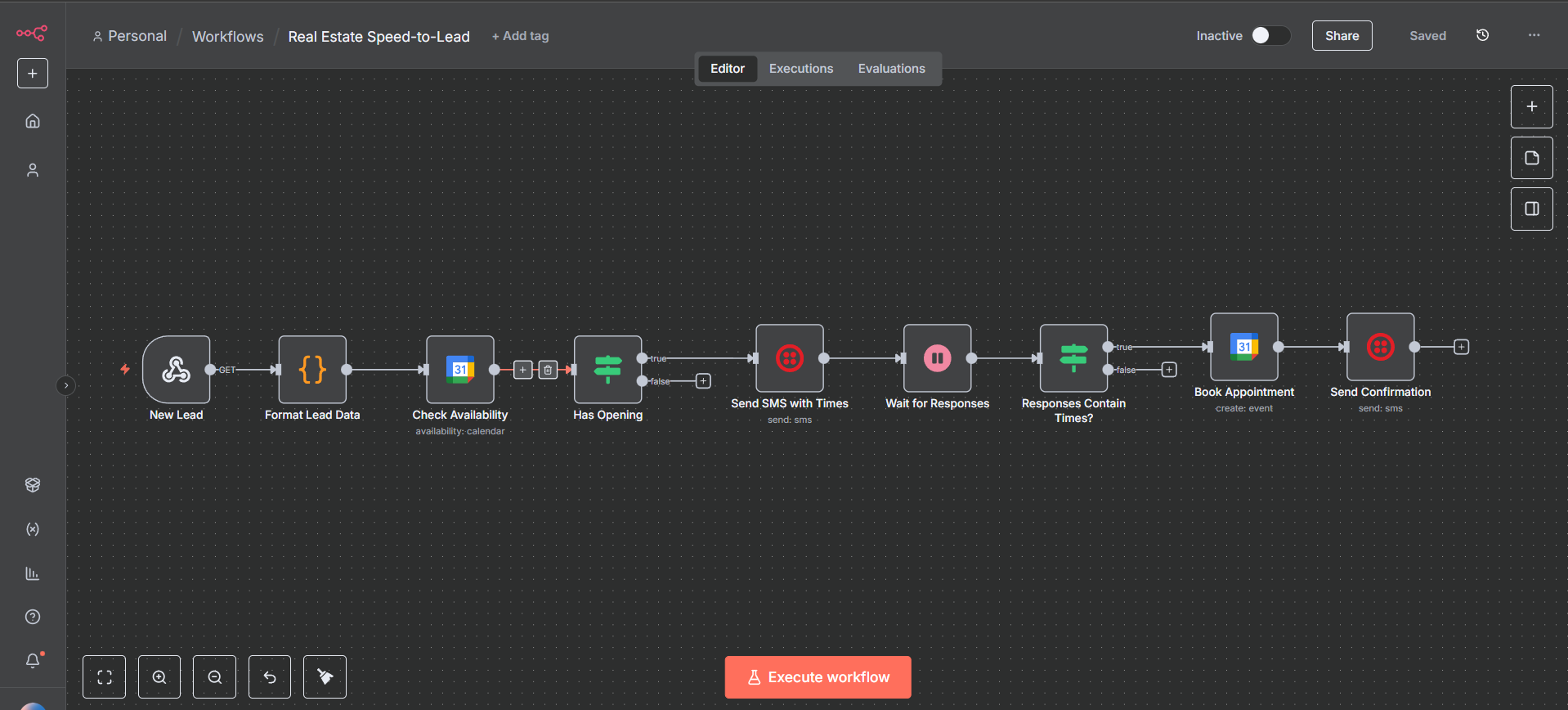
The Build: The “Real Estate Speed-to-Lead” System
Let’s look at a concrete example.
- The Pain: Real Estate Agents get leads from Zillow/Realtor.com. If they don’t reply in 5 mins, the lead is dead. They are often driving and miss the notification.
- The Product: “The 24/7 Virtual Leasing Agent.”
- The n8n Workflow:
- Universal Trigger: A webhook that accepts lead data (Name, Phone, Property).
- Logic: Check Calendar for availability.
- Action: Send SMS (via Twilio) “Hey [Name], saw you liked [Property]. I’m driving but I can show it tomorrow at 2 PM or 4 PM. Do either work?”
- Logic: Wait for reply. If reply contains “2 PM”, book slot.
How to Scale It:
- Parameterization: In n8n, use Global Variables or a Config Node at the start of the flow.
const CLIENT_PHONE = '+15550199'const CALENDAR_LINK = 'cal.com/agent-john'
- Deployment: When a new agent buys this $500 setup:
- Duplicate the workflow.
- Change the 3 variables.
- Hit “Activate”.
- Time spent: 10 minutes. Revenue: $500.
Pro Tip: Credential Management
n8n has a powerful Credential system. You can set up a “Template” workflow that references {{$credentials.twilioApi}}. When you deploy for Client B, you just select “Client B Twilio” from the dropdown. You don’t need to hunt through the code to find where the API key is used. It separates the logic from the secrets.
Common Pitfalls
- Feature Creep: Client A wants WhatsApp. Client B wants Telegram. Client C wants Email.
- The Fix: Be ruthless. “This is the product. It does SMS. If you want a custom Email version, that is a Custom Project and costs $3k.” Protect the standard model at all costs.
4. Business Model 3: Intelligent “Black Boxes” (AI Agents)
The Context: Intelligence is the Premium
“If This Then That” logic is becoming a commodity. Anyone can ask ChatGPT to write a Zapier step. The real money in 2026 is in Agentic Workflows—automations that can “think,” “research,” and “decide.”
This is where Zapier struggles (it gets expensive and messy) and where n8n shines with its LangChain integration.
The Build: The “AI RFP Analyst”
Agencies and B2B companies spend hours reading “Requests for Proposals” (RFPs) to see if they are a good fit.
- The “Black Box” Offer: “Send us the RFP PDF, and we will tell you if you should bid, and draft the initial response.”
- The n8n Workflow:
- Trigger: Email with Attachment.
- Step 1 (LangChain): Extract text from PDF using OCR.
- Step 2 (Vector Store): Compare the RFP requirements against the Client’s “Case Study Database” (hosted in Pinecone/Qdrant connected to n8n).
- Step 3 (AI Agent): Prompt: “Based on our past projects in the database, do we have a >80% chance of winning? List the gaps.”
- Output: Email a “Bid/No-Bid” scorecard to the Sales Director.
Why clients buy this
They aren’t buying the workflow; they are buying the Outcome (Time Saved on bad bids). Because the prompt engineering, the vector database setup, and the memory management are complex, the client cannot easily take this in-house. It creates a defensible “Moat” around your services.
Pro Tip: Structured Output
Don’t just let the AI ramble. Use n8n’s Structured Output Parser (connected to OpenAI or Anthropic) to force the AI to return JSON.
- Bad: “I think you should bid because…”
- Good:
{"recommendation": "BID", "confidence_score": 85, "missing_skills": ["Java", "Kubernetes"]}. This allows you to useIFnodes downstream (e.g., Only alert the CEO if confidence > 90%).
Common Pitfalls
- The “Hallucination” Liability: If your AI agent promises something the client can’t deliver, you are in trouble.
- Mitigation: Always have a “Human-in-the-Loop” step for critical actions. The AI drafts the email; a Human clicks “Approve” (using n8n’s Wait for Form node) before it is sent.
5. Implementation Guide: The “Agency Stack”
Hosting: The Foundation
Do not run your agency on your laptop based localhost. You need a server.
- Good: DigitalOcean Droplet ($20/mo) running Docker. Reliable, standard.
- Better: Hetzner Cloud (Germany/Finland). Unbeatable price-to-performance ratio. You can get serious power for €15/mo.
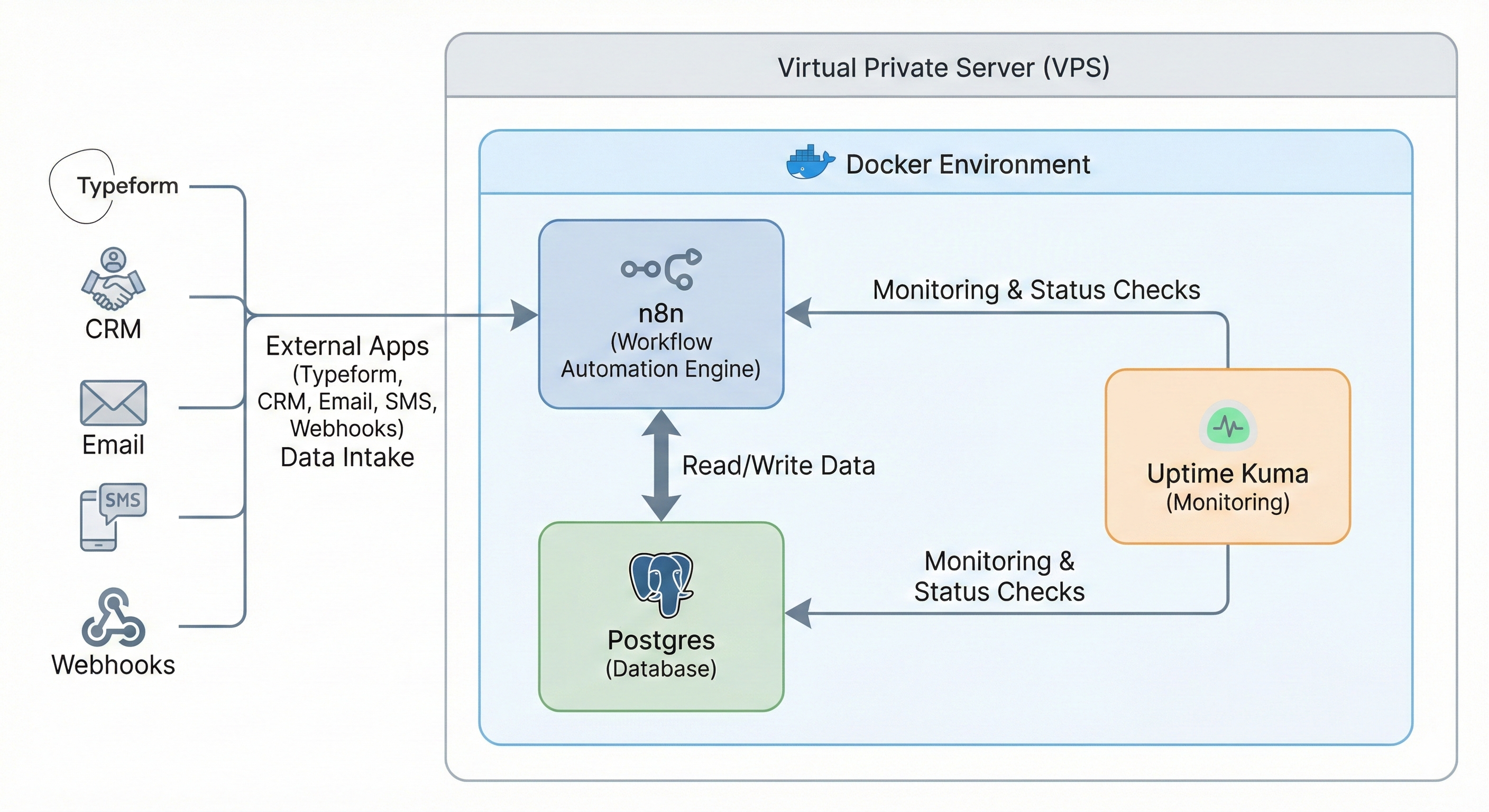
- Architecture: Use Docker Compose. This allows you to spin up n8n alongside other useful tools (Postgres, Redis) in a single command.
Monitoring: Trust but Verify
The worst way to find out a workflow is broken is from the client. You need to know first.
- Uptime Kuma: An open-source monitoring tool. Set it up to ping your n8n webhook every 5 minutes. If it doesn’t respond 200 OK, it alerts you via Slack/Telegram.
- Error Workflows: n8n allows you to set a “Global Error Workflow.” If any workflow fails, this special workflow runs. Configure it to send a detailed dump (Node Name, Error Message, Execution ID) to your internal Slack
#alertschannel.
Version Control: Promoting Safety
In Zapier, if you change a live Zap and break it, good luck. In n8n, you have Git Integration.
- Connect your n8n instance to a private GitHub repository.
- Treat your workflows like code. Commit changes before a major update.
- If you deploy a bug, you can “Rollback” to the version from yesterday. This is essential for Enterprise clients who demand stability.
6. Conclusion: Be the Architect, Not the Repairman
The era of the “Generalist Automation Consultant” is ending. The market is splitting. On one side, you have the “tinkerers”—fighting for $20/hour jobs on Upwork, competing with AI that can write scripts. On the other side, you have the Architecture Owners—agencies using n8n to build scalable, high-margin assets.
n8n gives you the “Factory” tools, not just the hand drill. It allows you to build systems that work for you, rather than systems you have to work on.
The Choice: You can keep paying the “Zapier Tax,” renting your tools and squeezing your margins. Or you can take ownership. Deploy your own infrastructure. Build your own “Digital Workers.” And start building a business that creates equity, not just invoices.