
Sync Notion Content to Vector DB for AI Retrieval
Ensure real-time knowledge for AI applications by automatically syncing new Notion content to your vector database, eliminating 100% of manual data preparation effort.
Manually updating AI knowledge bases with Notion content is tedious and leads to outdated information. This workflow automates the extraction, processing, and embedding of new Notion pages into a vector store, ensuring your AI applications always have access to the latest data.




Documentation
Automate Notion Content Synchronization to Vector Databases for AI
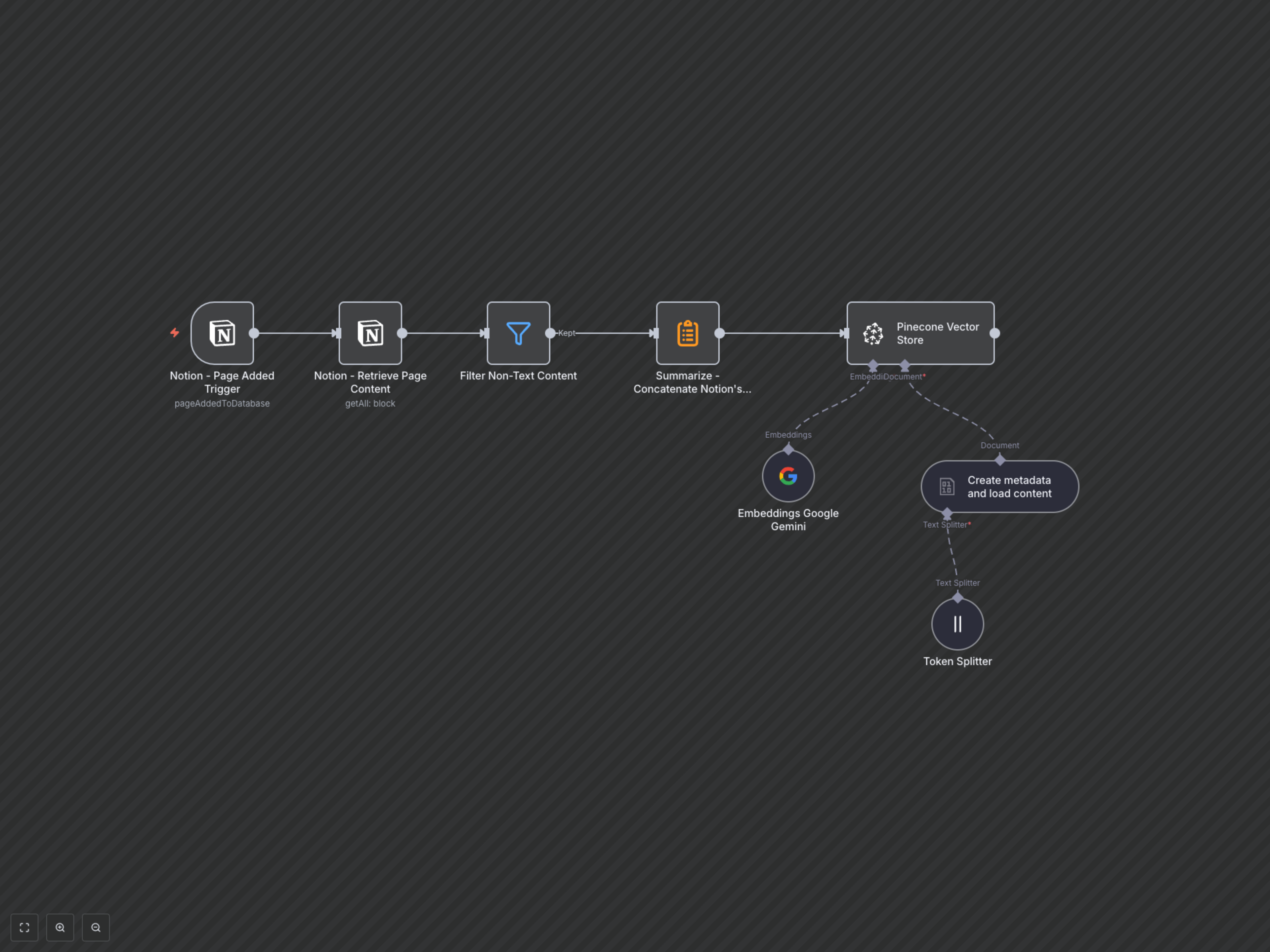
This powerful workflow provides a robust solution for keeping your AI knowledge bases current and accurate. It automatically detects new pages added to a specified Notion database, efficiently extracts and processes their text content for optimal AI consumption, and stores it as high-quality vector embeddings in a Pinecone database. This ensures your AI applications, such as Retrieval-Augmented Generation (RAG) systems or semantic search engines, always have access to the latest and most relevant information directly from your Notion workspace, without any manual intervention.
Key Features
- Automated Notion page monitoring: Triggers instantly when new content is added to a designated Notion database, ensuring immediate updates.
- Intelligent content extraction and filtering: Retrieves full page content, intelligently filters out non-text elements (like images and videos), and concatenates relevant text blocks.
- AI-ready data preparation: Enriches content with crucial metadata (page ID, title, creation time) and splits it into optimized, semantically coherent chunks for efficient embedding.
- Powerful vector embedding: Leverages Google Gemini's advanced `text-embedding-004` model to generate high-quality semantic representations of your Notion content.
- Seamless vector store integration: Automatically inserts processed documents and their embeddings into your Pinecone vector database, ready for immediate AI application use.
How It Works
The workflow begins by monitoring a user-defined Notion database for newly added pages. Upon detection, it efficiently retrieves the entire content of the new page, intelligently filters out any non-textual blocks such as images and videos, and then consolidates all remaining text into a single, cohesive document. This prepared content is then enriched with essential metadata pulled from the original Notion page, including its unique ID, creation timestamp, and title. To optimize for AI models and retrieval efficiency, the consolidated content is further split into smaller, manageable chunks using a token splitter. Google Gemini's advanced `text-embedding-004` model then transforms these text chunks into dense, numerical vector representations. Finally, these vectors, along with their corresponding text chunks and metadata, are securely inserted into your specified Pinecone vector database, making them instantly available for use by your AI applications for tasks like semantic search, question-answering, or RAG.