
Shopify Order Cancellation Tracking & Customer Notification Automation
Reduce support workload by 80% through automated cancellation logging and instant customer notifications.
Order cancellations often create confusion, missed customer updates, and inconsistent internal records. This workflow captures every Shopify order cancellation, cleans contact data, logs key details into Google Sheets, and automatically notifies customers when an email is available. By removing manual data entry and improving communication accuracy, brands save hours of operational work and prevent customer dissatisfaction.




Documentation
Description
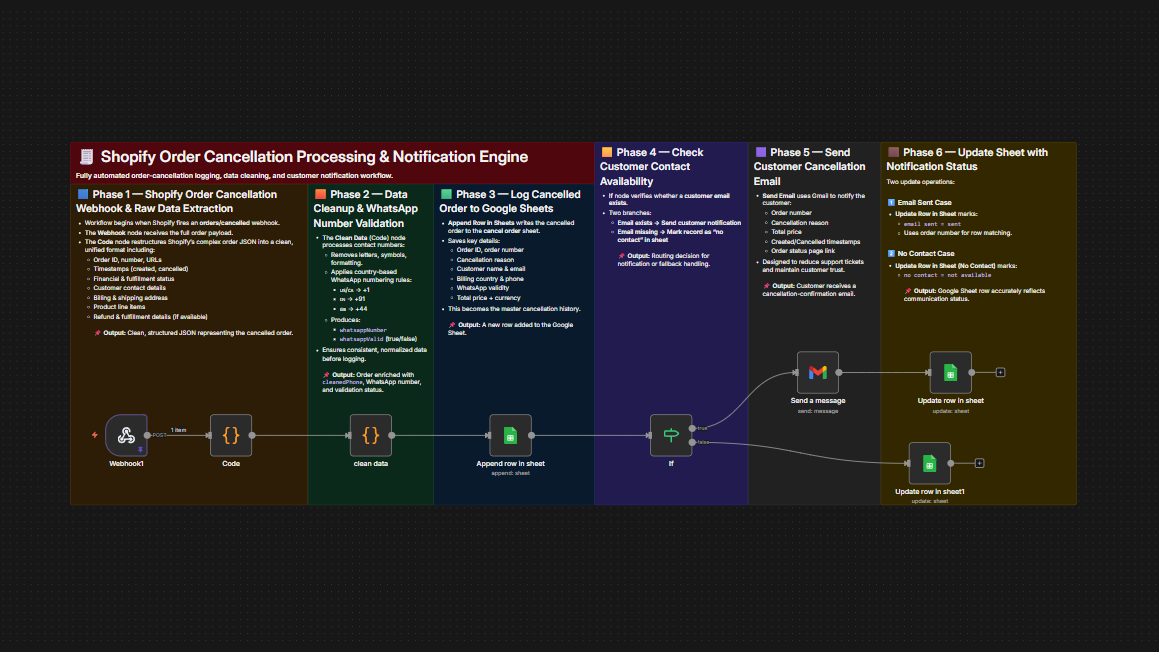
This automation ensures full visibility and instant communication whenever a customer cancels a Shopify order. The system restructures Shopify’s raw payload, cleans customer contact information, validates WhatsApp numbers, logs all order details to a structured Google Sheet, and automatically notifies customers when email is available. This eliminates manual effort, reduces ticket volume, and ensures accurate cancellation records across your operations.
Workflow Steps
- Receive Shopify Cancellation EventThe workflow starts when Shopify sends a cancellation webhook for an order.
- Extract and Standardize Order DataThe system restructures the complex Shopify payload into a clean, consistent format, including order details, customer info, product list, timestamps and refund data.
- Clean and Validate Contact InformationPhone numbers are cleaned, normalized, and converted into valid WhatsApp formats using country rules.
- Log All Cancellation Details in Google SheetsA new row is added with order number, cancellation reason, customer info, country, WhatsApp validity, and total price.
- Check Customer Contact AvailabilityIf an email exists, the customer receives a personalized cancellation notification. If not, the workflow marks the record as “no contact” in the sheet.
- Send Personalized Cancellation EmailCustomers receive a confirmation message summarizing the cancellation and providing order details and the status page link.
- Update Communication Status in SheetThe sheet is updated to reflect whether an email was sent or not.
Key Benefits
- Eliminate Manual Cancellation TrackingEvery cancellation is automatically logged with complete and accurate details.
- Reduce Support Tickets & Customer ConfusionCustomers receive real-time cancellation updates with clear order information.
- Ensure Reliable Data for Reporting & AnalysisClean contact data, structured records, and automated status updates improve operational insights.