
Shopify Customer to Odoo CRM Sync Automation
Prevent duplicate CRM records and reduce manual data entry by 100% through automated Shopify-to-Odoo customer sync.
Sales teams lose time entering customer information into Odoo and correcting duplicate contacts. This workflow instantly checks for an existing email match and only creates a new Odoo customer when necessary. It ensures your CRM stays clean and updated automatically, saving effort while improving lead accuracy and tracking.


Documentation
🔍 Description
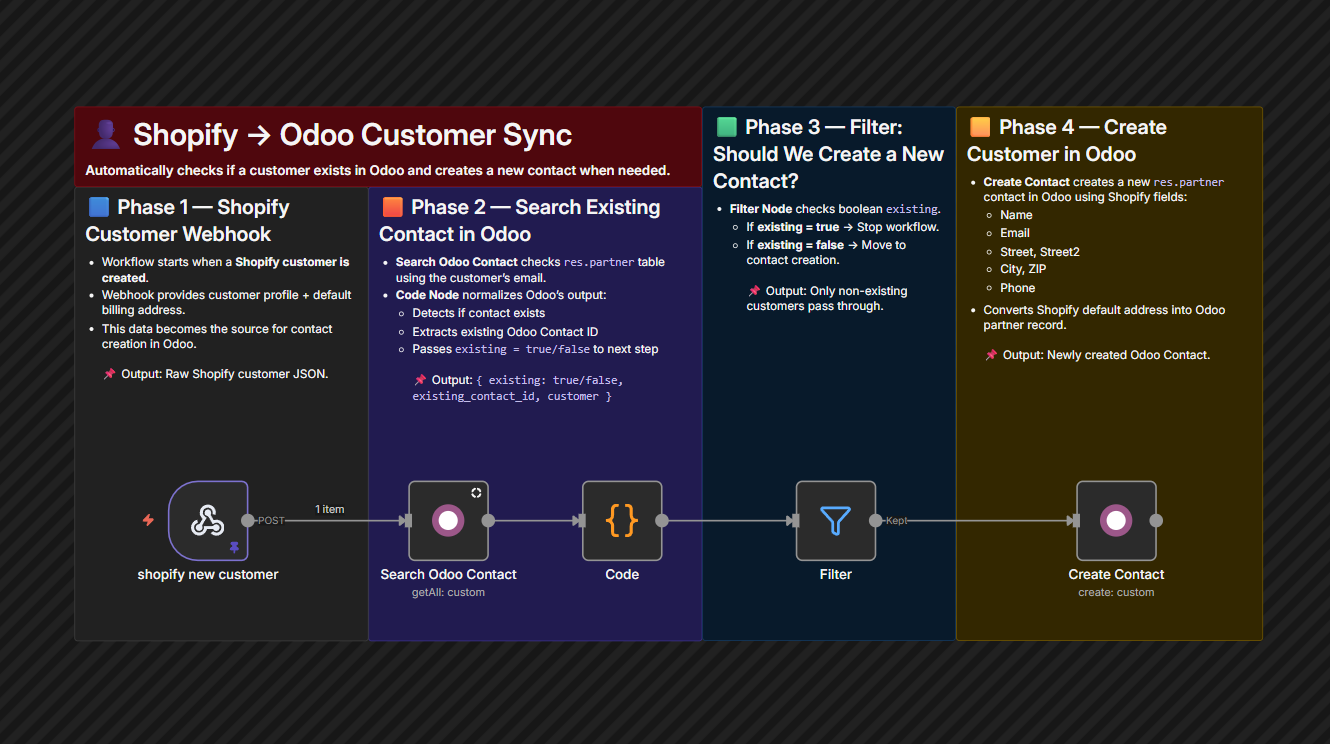
This automation connects Shopify and Odoo so customer data is always in sync. When a new customer signs up through Shopify, the workflow checks if that email already exists inside Odoo. If not found, a new CRM contact is created using the full address and profile data — hands-free automation for clean and reliable CRM records.
It eliminates manual updates, improves data governance, and keeps sales and operations aligned.
🔄 Workflow Steps
- Shopify sends a webhook when a new customer account is created.
- The workflow searches Odoo CRM for a matching email address.
- Code node confirms whether an existing contact already exists.
- If not found — a new contact is automatically created in Odoo.
- Workflow stops when duplicates are detected — no unnecessary records.
⭐ Key Benefits
- Eliminate Duplicate ContactsEmail-based validation keeps CRM clean and unified.
- Save Time & Data Entry CostsNo more copy-paste or back office admin for new customers.
- Better Customer TrackingEvery Shopify buyer appears instantly in Odoo for follow-up.