
Real-time Error Alerts: Email n8n Workflow Failures via Gmail
Receive immediate, comprehensive error notifications for all n8n workflows, reducing downtime by up to 90% and significantly improving operational stability.
Unnoticed workflow failures can lead to data discrepancies, missed tasks, or downtime, impacting business operations. This robust error handling workflow provides instant, detailed email alerts via Gmail for both execution and trigger errors in your n8n workflows, ensuring rapid response and minimal disruption.


Documentation
Monitor n8n Workflows with Real-time Gmail Error Alerts
Ensure your critical n8n automations run smoothly and reliably by receiving instant, detailed email notifications whenever any of your workflows encounter an error. This solution covers both execution-level and trigger-level failures, giving you full visibility and the ability to respond swiftly to any issues.
Key Features
- Receive immediate email alerts for both workflow execution errors and trigger failures.
- Get comprehensive error details directly in your inbox, including the failed workflow's ID, name, error source, and a descriptive error message.
- Access dynamic links to both the failing workflow and the error handling workflow for quick navigation and investigation.
- Obtain a complete, machine-readable JSON payload of the error for advanced troubleshooting and integration with other systems.
- Centrally manage error notifications for all your critical n8n automations from a single, reusable workflow.
How It Works
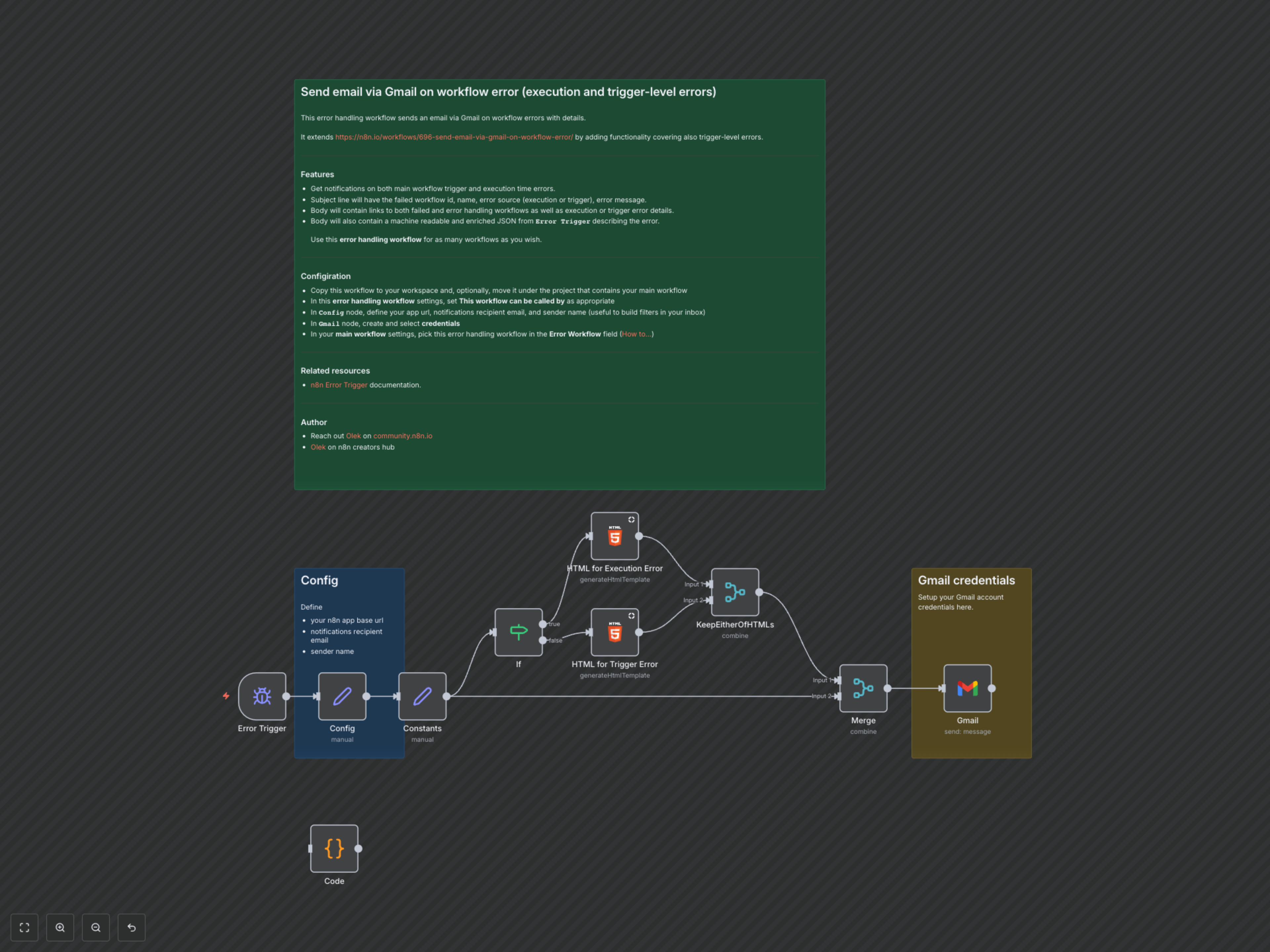
This workflow is automatically triggered whenever an error occurs in any n8n workflow configured to use it as an error handler. The initial 'Error Trigger' node captures all relevant error data. It then intelligently branches logic using an 'If' node to differentiate between execution errors and trigger failures. Dedicated 'HTML' nodes dynamically format the specific error details into a clear, concise HTML email body, including essential information like workflow links, error messages, stack traces, and a full JSON dump of the error context. Finally, the 'Gmail' node dispatches this comprehensive error report to your specified recipient, ensuring you have all the necessary context for rapid diagnosis and resolution.