
Boost RAG Performance: Context-Aware Chunking from Google Drive
Improve RAG retrieval accuracy by up to 30% by enriching document chunks with dynamic, AI-generated context, leading to more precise and relevant AI responses.
Traditional RAG often suffers from fixed-size document chunking, losing valuable context and diminishing retrieval accuracy. This workflow leverages AI to create context-aware document chunks from Google Drive, transforming them into rich embeddings in Pinecone for significantly enhanced RAG application performance.



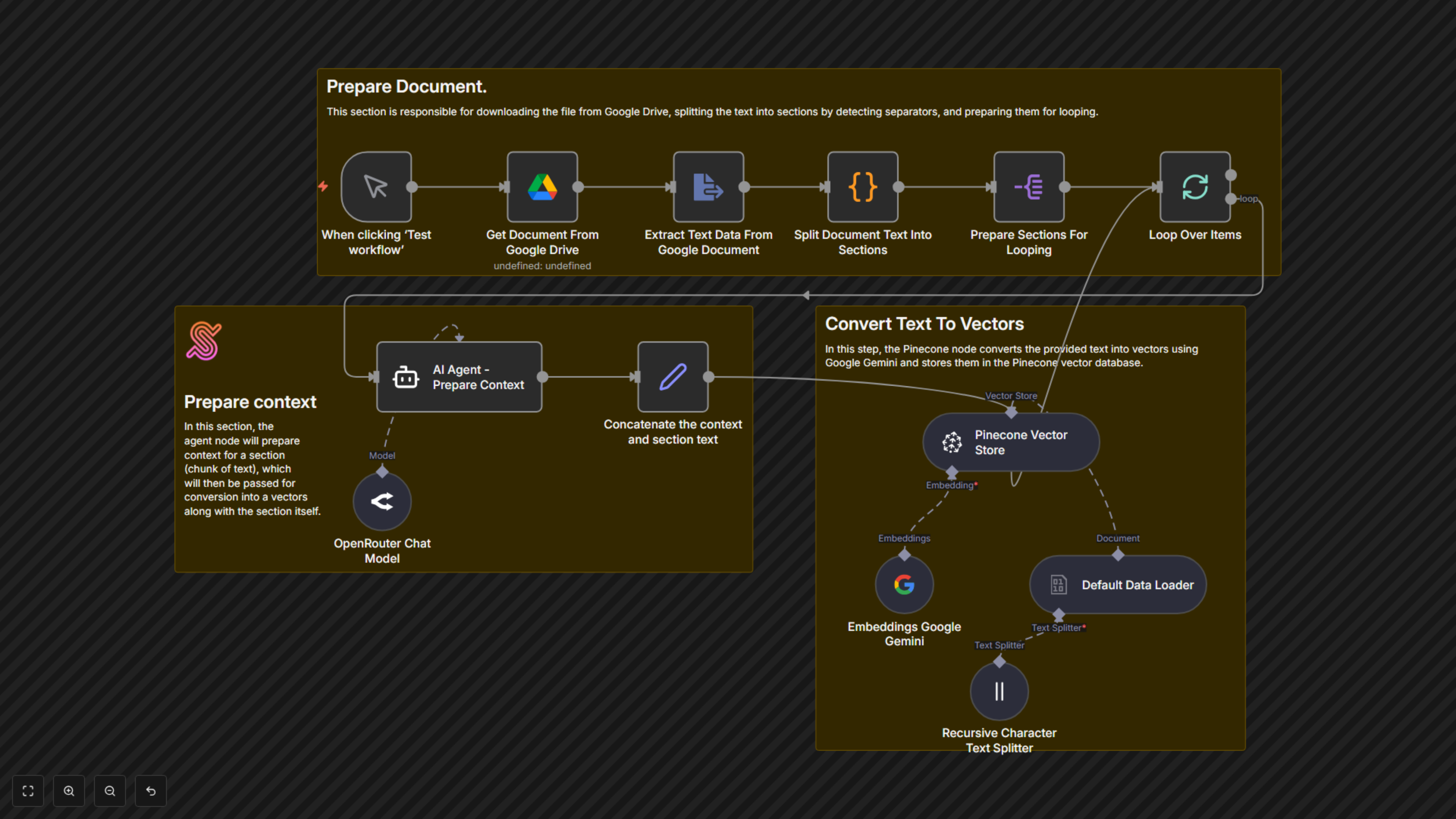
Documentation
RAG: Context-Aware Chunking from Google Drive to Pinecone
This n8n workflow automates the crucial process of preparing documents for advanced Retrieval Augmented Generation (RAG) systems. It intelligently breaks down documents, enriches each section with AI-generated context, and stores them as vectors, ensuring your RAG applications deliver highly relevant and accurate information.
Key Features
- Automated Google Drive Document Ingestion: Seamlessly pull documents directly from your Google Drive.
- Intelligent Document Sectioning: Breaks down large documents into manageable sections based on defined separators.
- AI-Powered Context Generation: Utilizes an AI agent (via OpenRouter and Gemini) to craft succinct, context-rich summaries for each document chunk.
- Enhanced Vector Embeddings: Combines original content with AI-generated context for richer, more precise embeddings.
- Pinecone Vector Database Integration: Automatically stores context-aware vectors in your Pinecone index, optimized for RAG.
- Boosted RAG Performance: Improves the relevance and accuracy of information retrieved by your RAG applications.
How It Works
This workflow initiates upon manual trigger or schedule. First, it downloads a specified document from Google Drive and extracts its text content. A custom code step then splits the document into logical sections using a predefined separator (—---------------------------—-------------[SECTIONEND]—---------------------------—-------------). Each section is then processed in a loop: an AI Agent (powered by OpenRouter and Google Gemini embeddings) generates a concise contextual summary for that specific chunk, referencing the entire document for accuracy. This AI-generated context is then prepended to the original chunk text. Finally, this context-aware chunk is converted into a vector embedding using Google Gemini and stored in your Pinecone vector database. This process ensures that each stored chunk contains vital contextual information, significantly improving retrieval quality for RAG applications.