
Automate Search Console Data to Google Sheets for SEO Reporting
Automatically update Google Sheets with daily Search Console performance data, saving hours of manual data extraction and enabling real-time SEO analysis.
Manually extracting and organizing Google Search Console data is time-consuming and prone to errors, hindering timely SEO analysis. This workflow automatically fetches comprehensive keyword, page, and date performance metrics from Google Search Console and populates them into Google Sheets for effortless reporting and deeper insights.


Documentation
Automated Google Search Console Reporting to Google Sheets
This n8n workflow streamlines the process of extracting critical SEO data from Google Search Console and centralizing it within Google Sheets. Designed for digital marketers, SEO specialists, and web analysts, it eliminates manual data compilation, providing up-to-date insights for performance tracking and strategic decision-making.
Key Features
- Automated data retrieval from Google Search Console for specified domains.
- Comprehensive reporting for keywords, individual pages, and daily performance metrics.
- Seamless integration to append or update data in a designated Google Sheet.
- Customizable scheduling for regular, hands-free updates.
How It Works
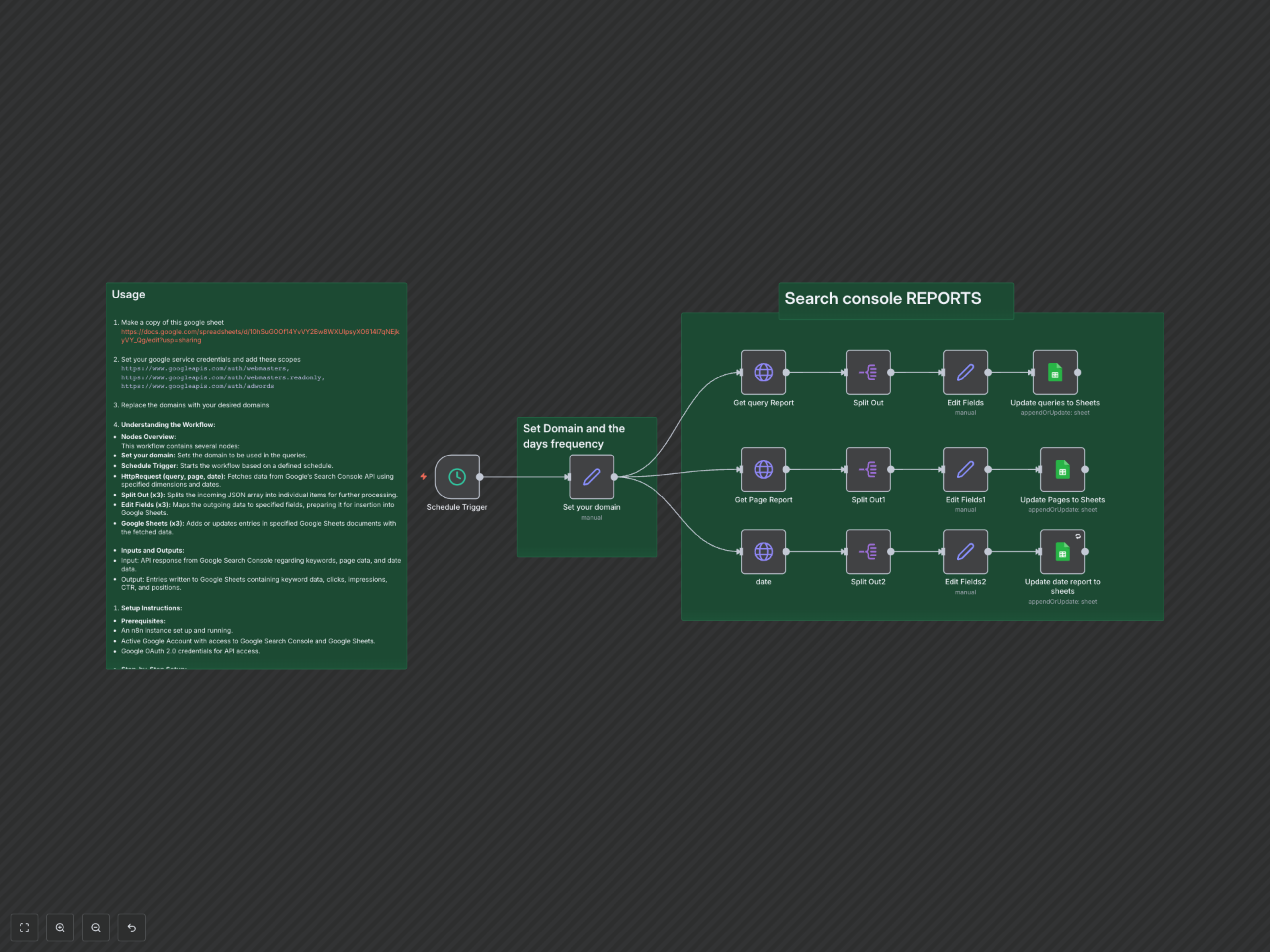
The workflow begins with a 'Schedule Trigger' that initiates the process at predefined intervals. A 'Set your domain' node then specifies the target website and the number of days for which data should be fetched. Three 'HTTP Request' nodes subsequently connect to the Google Search Console API to retrieve performance data based on 'query' (keywords), 'page', and 'date' dimensions. Each set of data is then processed by a 'Split Out' node to handle individual data rows, followed by an 'Edit Fields' (Set) node to rename and standardize the fields (e.g., 'keys[0]' to 'Keyword', 'page', or 'date', along with 'clicks', 'impressions', 'ctr', and 'position'). Finally, three 'Google Sheets' nodes seamlessly append or update this structured data into dedicated tabs within your specified Google Sheet, ensuring your SEO reports are always current.