
Automate Property Lead Enrichment for CRM & Excel Export
Automatically generate up to 50 highly qualified real estate leads daily, reducing manual research and data entry by over 90% and accelerating sales pipelines.
Manual property lead generation, filtering, and contact enrichment are time-consuming and prone to errors. This n8n workflow fully automates identifying qualified real estate leads, obtaining owner contact details, and seamlessly pushing them to your CRM and an Excel report.


Documentation
Property Lead Contact Enrichment from CRM
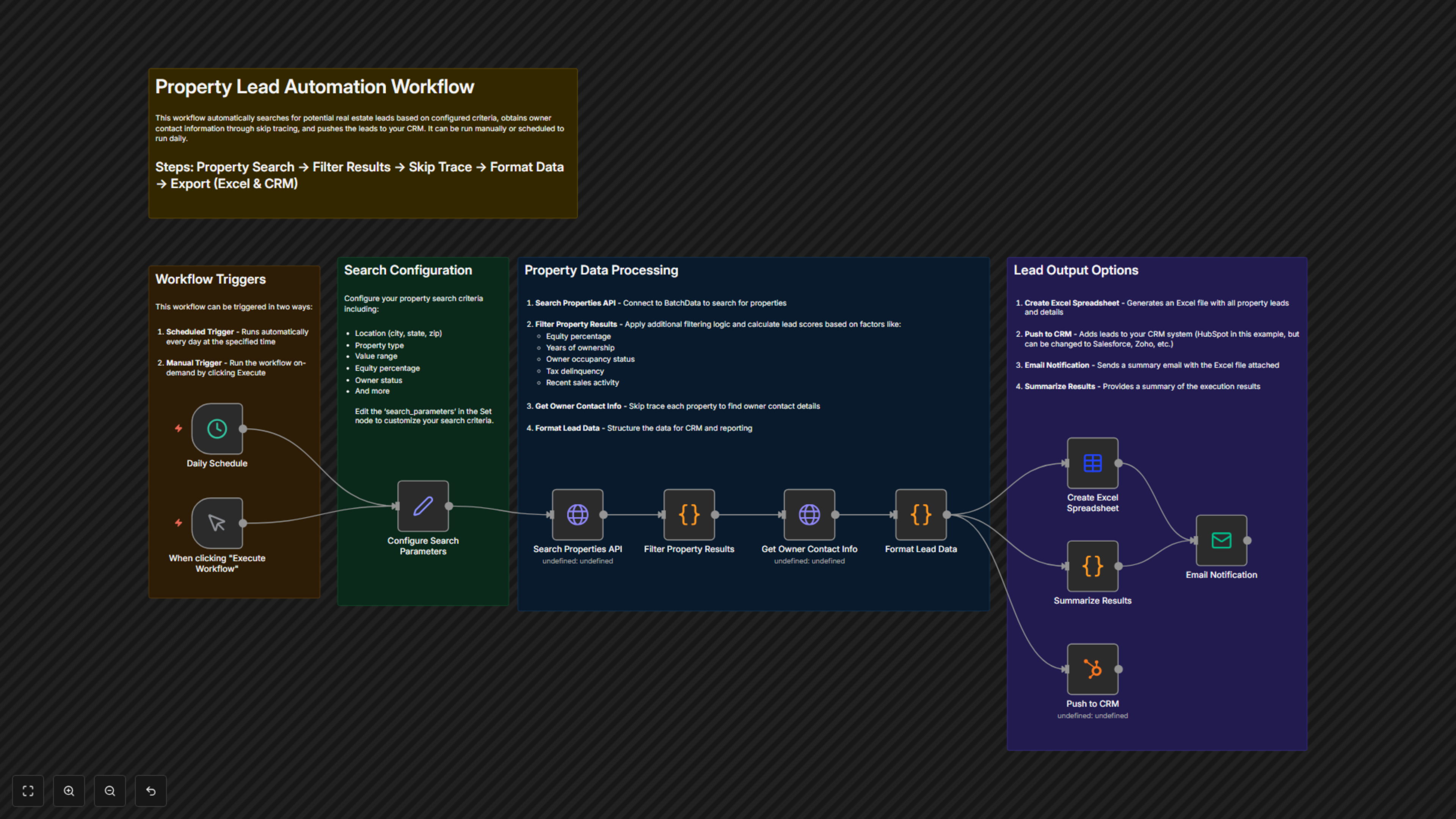
This powerful n8n workflow revolutionizes real estate lead generation by automating the entire process from property discovery to CRM integration. Designed for real estate investors, agents, and lead generation teams, it identifies high-potential properties, enriches them with crucial owner contact information, and streamlines delivery to your sales tools.
Key Features
- Automated Property Search: Configure precise criteria (location, property type, value, equity, status) to find ideal investment or sales opportunities.
- Intelligent Lead Filtering & Scoring: Apply custom logic to identify absentee owners, long-term ownership, lack of recent sales, tax delinquencies, and assign a lead score to prioritize prospects.
- Automated Skip Tracing: Automatically obtain owner contact details, including emails and phone numbers, for qualified leads.
- CRM Integration: Seamlessly push enriched leads directly into your Customer Relationship Management (CRM) system, such as HubSpot.
- Daily Reporting & Notifications: Generate an Excel spreadsheet with all lead data and receive a summary email notification, keeping you informed effortlessly.
How It Works
This workflow can be triggered manually or run automatically on a daily schedule. It begins by configuring your specific property search parameters (e.g., location, property type, value range, equity percentage, owner status) which are then used to query the BatchData API. The results are meticulously filtered using custom code to identify properties matching your criteria, such as absentee ownership, long-term ownership, and absence of recent sales, with each lead receiving a dynamic 'lead_score'. For these qualified leads, the workflow performs skip tracing via the BatchData API to retrieve owner contact information (email, phone, mailing address). All the gathered property and owner data is then formatted into a standardized lead record. Finally, these enriched leads are simultaneously pushed to your CRM (e.g., HubSpot), compiled into a daily Excel spreadsheet, and a summary email notification is sent with the report attached.