
Automate EDI Order Processing: Email to Google Sheets Data Entry
Automate EDI order data extraction and logging, reducing manual data entry time by up to 90% and improving order processing accuracy.
Manually extracting and logging EDI order data from emails into spreadsheets is time-consuming and prone to errors. This workflow automates the process by parsing complex EDI messages from emails and logging critical order details into Google Sheets, ensuring data accuracy and saving significant operational time.


Documentation
Automated EDI Order Processing
This powerful n8n workflow revolutionizes how businesses handle Electronic Data Interchange (EDI) order messages. By automating the entire process from email reception to data logging, it ensures critical order information is swiftly and accurately captured, reducing manual effort and potential errors. Ideal for streamlining supply chain operations, order fulfillment, and inventory management.
Key Benefits
- Automated monitoring of Gmail for incoming EDI order messages.
- Intelligent parsing of complex EDI documents to extract all relevant order details (headers, dates, parties, line items).
- Dynamic classification of orders (e.g., Return Orders, Outbound Orders).
- Seamless integration with Google Sheets for structured data logging.
- Eliminates manual data entry, saving time and improving data accuracy.
How It Works
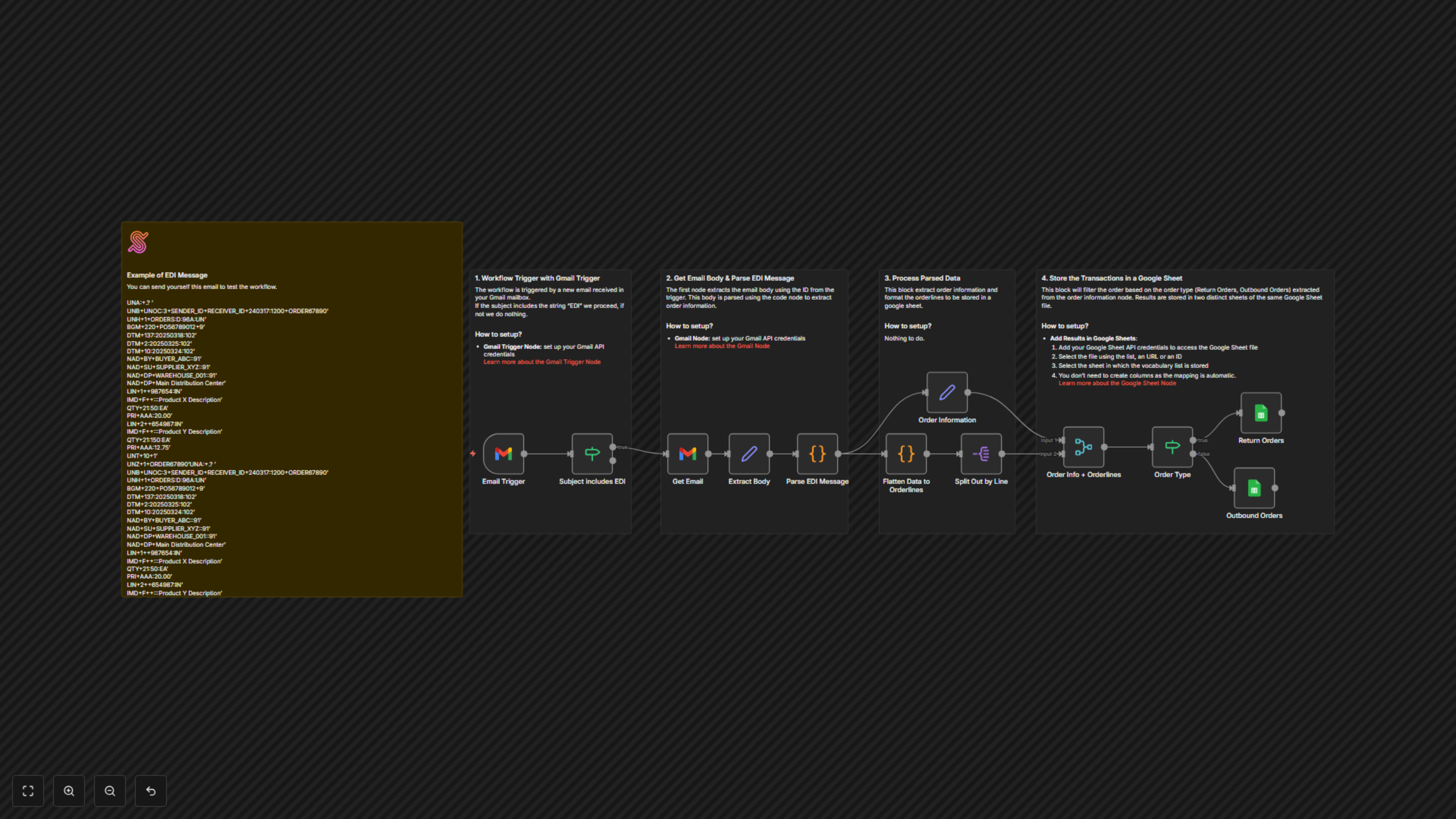
This workflow is designed to automatically capture, interpret, and store EDI order messages received via email. Here's a step-by-step breakdown:
1. Triggered by New EDI Emails
The workflow begins with a Gmail Trigger node, constantly monitoring your specified inbox for new emails. An If node then intelligently filters these emails, proceeding only if the subject line contains the term "EDI," ensuring only relevant messages are processed.
2. Extract and Parse EDI Data
Upon identifying an EDI email, the Get Email node extracts the full message body. This raw EDI text is then fed into a Code node (Parse EDI Message), which acts as a sophisticated EDI parser. It breaks down the complex EDI structure into individual segments, extracting key information such as interchange headers (sender, receiver, date/time), message headers, order details (document type, number, function), multiple dates (document, delivery, shipment), party information (buyer, supplier, delivery), and all detailed line items (product ID, description, quantity, price).
3. Structure and Flatten Order Information
After parsing, the Order Information (Set node) extracts a summary of the order (document type, number, date, line item count, total quantity). Concurrently, the Flatten Data to Orderlines (Code node) transforms the hierarchical parsed EDI data into a flat, tabular format. This process ensures that each line item gets its own record, complete with all associated header, date, and party details, making it perfectly suited for spreadsheet storage. The Split Out by Line and Merge nodes then combine this flattened data with the overall order summary, preparing it for conditional storage.
4. Route and Log Orders to Google Sheets
An If node (Order Type) evaluates the extracted 'documentType' from the order summary. If it identifies a "Return Order," the data is routed to the Return Orders (Google Sheets node). Otherwise, it's considered an "Outbound Order" and sent to the Outbound Orders (Google Sheets node). Both Google Sheets nodes automatically append the meticulously structured order data to their respective sheets within a central Google Sheet document. This ensures that all EDI transactions are categorized and recorded accurately without any manual intervention.