
Automate CRM Address Verification to Ensure Deliverability
Automatically verify 100% of new CRM contact addresses, reducing manual data entry and verification time by hours while eliminating costly failed mailings.
Manually verifying CRM addresses is a time-consuming and error-prone task that leads to failed deliveries and wasted resources. This workflow automatically validates new CRM contact addresses using Lob.com, instantly updating your records to ensure accurate mailings and improved data quality.


Documentation
Automate CRM Address Verification
This workflow streamlines the process of validating mailing addresses for new contacts added to your CRM, such as Groundhogg. It ensures accuracy and helps catch manual entry errors before they impact your outreach efforts and budget.
Key Features
- Automated Address Validation: Instantly verify contact mailing addresses upon creation in your CRM.
- Enhanced Data Quality: Maintain accurate contact information, reducing bounce rates for physical mail and improving campaign ROI.
- Error Detection: Automatically identifies potential misspellings or invalid addresses, preventing manual verification.
- Conditional CRM Updates: Tags contacts as 'Deliverable' or 'Not Deliverable' based on verification results, triggering tailored follow-up automations.
How It Works
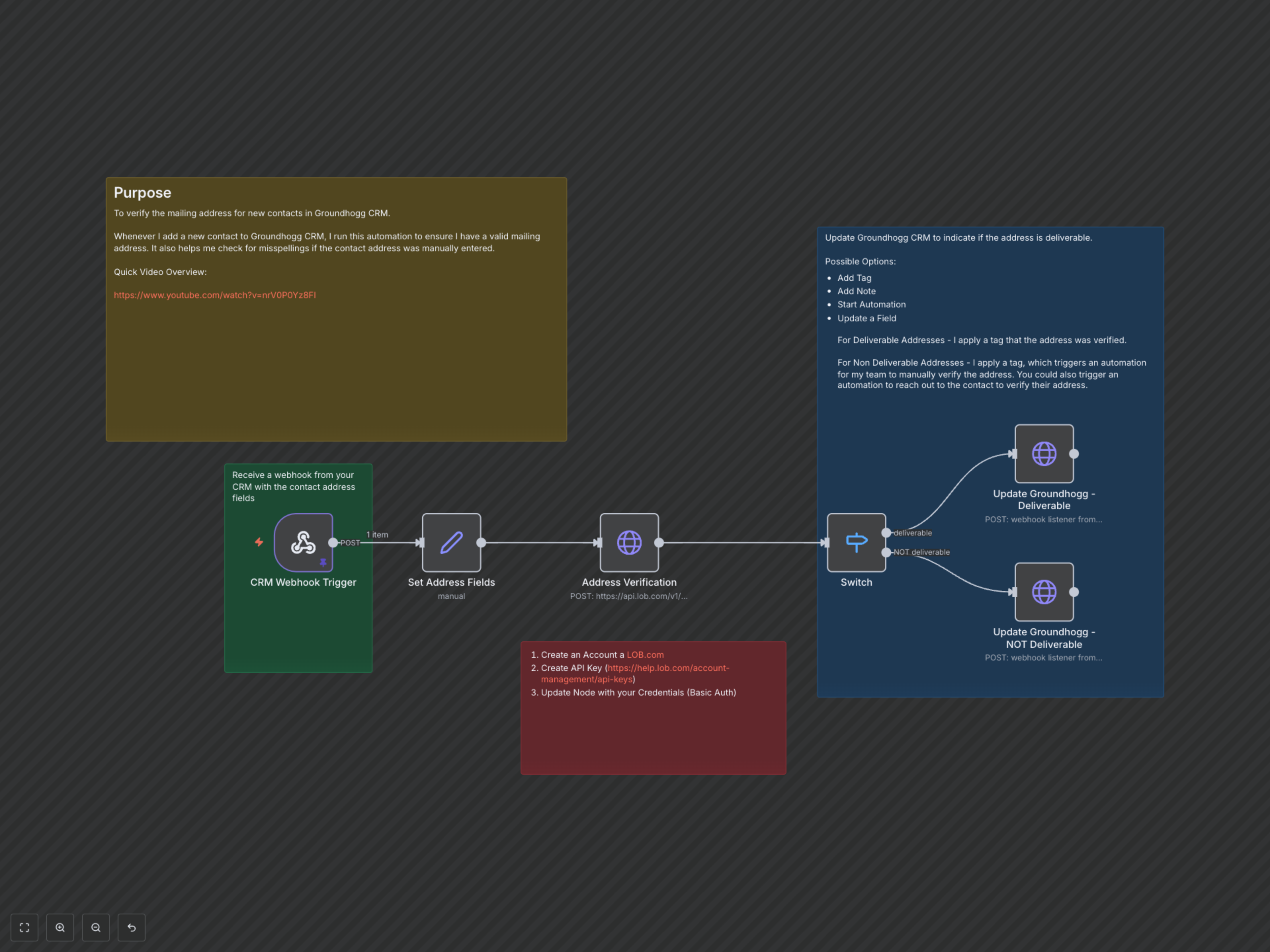
The workflow is initiated when a new contact is added to your CRM (e.g., Groundhogg), triggering a webhook that sends the contact's address details to n8n. These details are then standardized and sent to Lob.com's robust address verification API. Based on Lob.com's 'deliverability' response, the workflow routes the contact information to one of two paths. For deliverable addresses, it sends a webhook back to your CRM to apply a 'Mailing Address Deliverable' tag. For non-deliverable addresses, a 'Mailing Address NOT Deliverable' tag is applied, which can trigger further CRM automations like notifying a team member for manual review or initiating an email sequence to collect updated contact information.