
Automate AI SEO Content Creation, WordPress Publishing & Notion Sync
Generate, publish, and track SEO-optimized articles in minutes, drastically reducing content creation and publication cycles while ensuring real-time updates and notifications.
Manually writing, publishing, and tracking SEO-optimized articles is a time-consuming and fragmented process. This workflow autonomously generates SEO-friendly articles using AI, publishes them to WordPress, sends email notifications, and updates your Notion database, streamlining content operations.


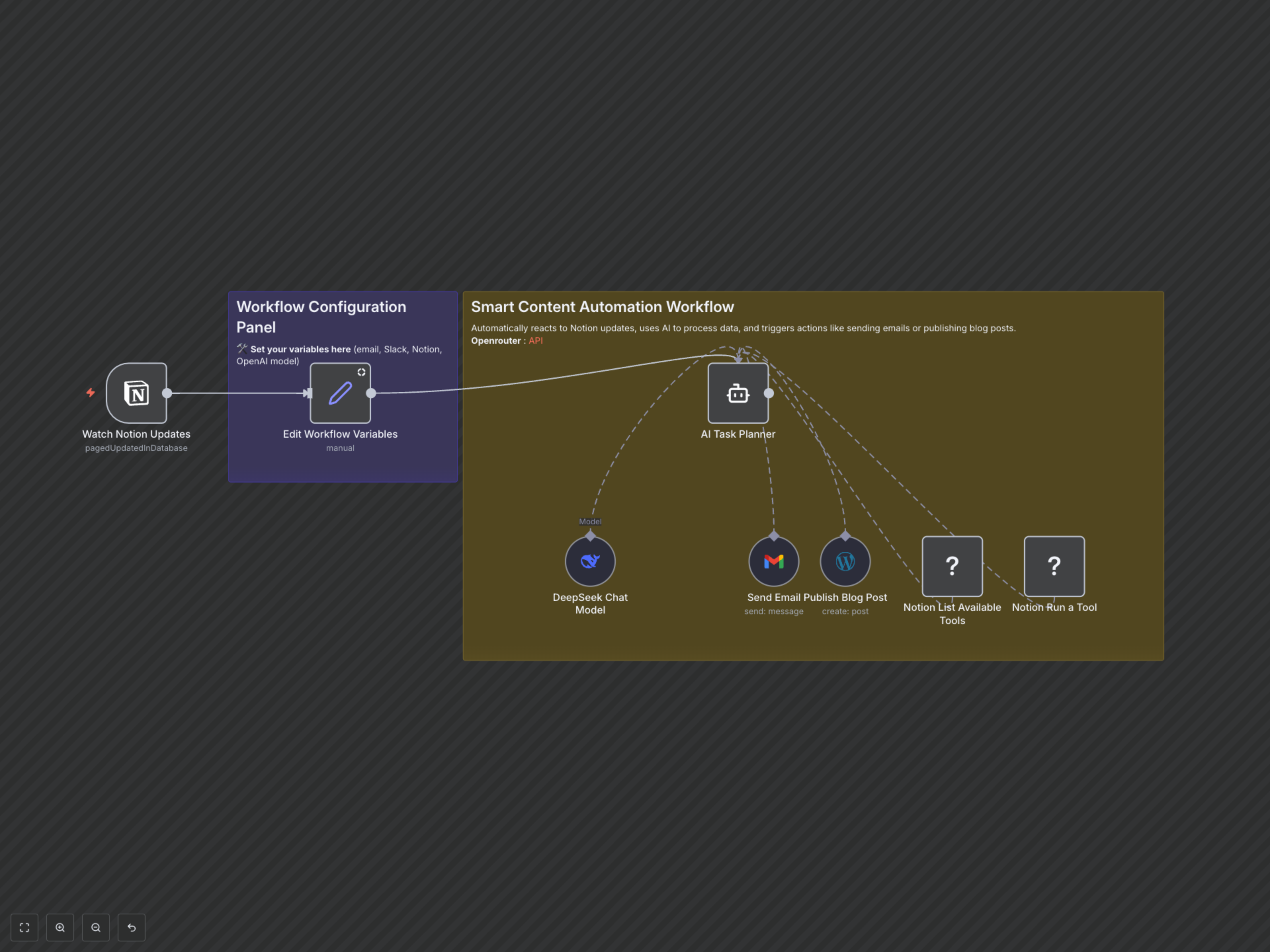

Documentation
AI-Powered SEO Content Automation
This n8n workflow revolutionizes your content creation process by fully automating the generation, publication, and tracking of SEO-optimized articles. It integrates Notion, AI models like DeepSeek, WordPress, and Gmail to provide a seamless end-to-end solution for content marketers and publishers.
Key Features
- Triggers content creation automatically upon Notion database updates.
- Leverages DeepSeek AI to generate unique, SEO-optimized articles (up to 20 lines) with H1/H2 structures.
- Publishes generated articles directly to your WordPress blog, including title and content.
- Notifies specified recipients via email with the article title and live URL.
- Updates the original Notion database entry with the published article's details (title, content, URL, status).
- Ensures a structured, step-by-step content creation and publication process via an intelligent AI agent.
How It Works
The workflow begins by monitoring a specified Notion database for page updates. When an update occurs, the workflow extracts keywords from the Notion page's 'Name' property. These keywords, along with user-defined variables (email, Notion database/item IDs), are passed to an AI Task Planner powered by the DeepSeek Chat Model. The AI agent then executes a series of actions: It first crafts a concise, SEO-optimized article (maximum 20 lines) based on the provided keywords and content writing guidelines. Next, it publishes this article to your WordPress blog, setting the title and body content. Simultaneously, an email notification is sent to a predefined address, including the article's title and its live WordPress URL. Finally, the workflow interacts with Notion to retrieve available tools and then updates the initial Notion database entry with the newly published article's title, SEO content, URL, and a 'publish' status. This ensures a fully automated loop from idea inception in Notion to published article and status update.