AI-Powered Jira Ticketing Chatbot for DevOps
Users can interact with an AI chatbot that automatically manages Jira tickets in real time — creating, retrieving, and updating issues through chat, saving significant time for DevOps and IT support teams.
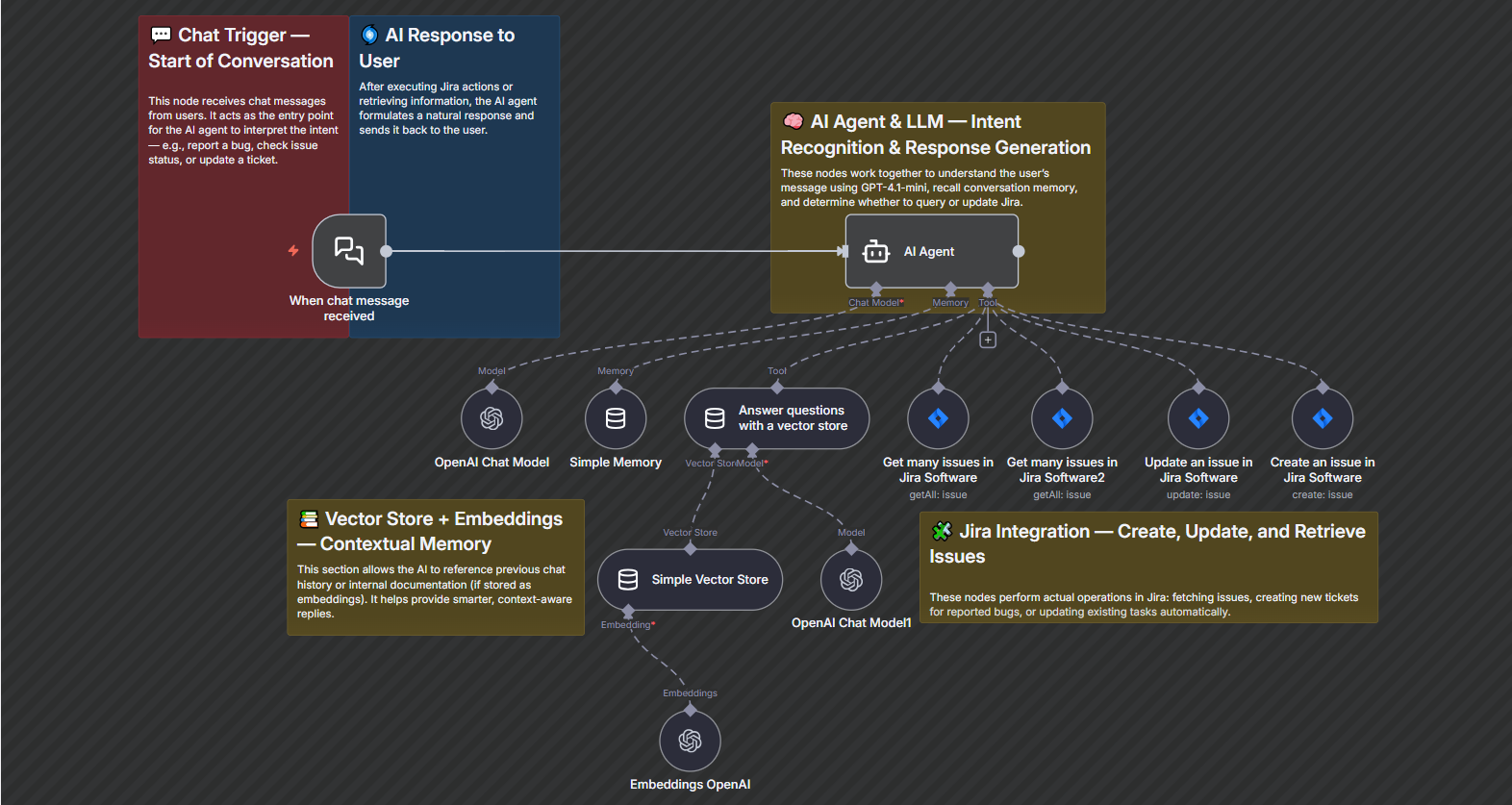
This workflow automates Jira ticket creation, retrieval, and updates using a conversational chatbot built in n8n with OpenAI GPT-4.1-mini. It’s designed for DevOps teams to streamline ticket management — allowing engineers to create, check, or modify Jira issues simply by chatting with an AI assistant.


$29
Ready-to-use workflow template
Complete workflow template
Setup documentation
Community support
Preview - N8n

Documentation
- The chatbot receives a message from a user via the Chat Trigger node.
- The AI Agent processes the intent using GPT-4.1-mini and context memory.
- Based on user intent, the workflow executes Jira actions such as create, get, or update an issue.
- The AI replies to the user with the ticket number, details, or a confirmation message.
- Context is stored in memory and the vector store for ongoing conversation continuity.
Benefits for Customers / Users
- Conversational Ticketing – Create and manage Jira tickets using natural language, no manual form-filling.
- Automation for DevOps – Automatically handles ticket creation, status updates, and retrieval to reduce engineer workload.
- Faster Issue Tracking – Quickly check or update issues directly through chat without logging into Jira.
- Context-Aware Responses – The AI remembers previous messages and follows up logically in multi-turn conversations.
- Smart Knowledge Handling – Vector store memory enables accurate, consistent responses across multiple ticket queries.
Requirements
1. Jira Cloud Account & API Access
- Jira project ID and issue type ID are required.
- User must have permission to create and update issues in the specified project.
- Jira base URL and API token must be stored securely in n8n credentials.
2. n8n Platform Setup
- Ensure n8n is running locally or on a server with webhook access.
- Required n8n nodes installed:
- @n8n/n8n-nodes-langchain.chatTrigger
- @n8n/n8n-nodes-langchain.agent
- n8n-nodes-base.jiraTool
- @n8n/n8n-nodes-langchain.memoryBufferWindow
- @n8n/n8n-nodes-langchain.vectorStoreInMemory
3. OpenAI API Key
- Needed for GPT-4.1-mini and embeddings nodes.
- The API key must be stored in the OpenAI credential section of n8n.