
Automate Meeting Tasks, Client Notifications & Scheduling
Automate meeting follow-up, saving hours weekly and ensuring critical tasks are captured and communicated instantly.
Manually tracking meeting action items and notifying clients is time-consuming and error-prone, leading to missed tasks. This workflow leverages AI to automatically extract tasks from Fireflies transcripts, create them in Airtable, notify clients, and even schedule follow-up calls.



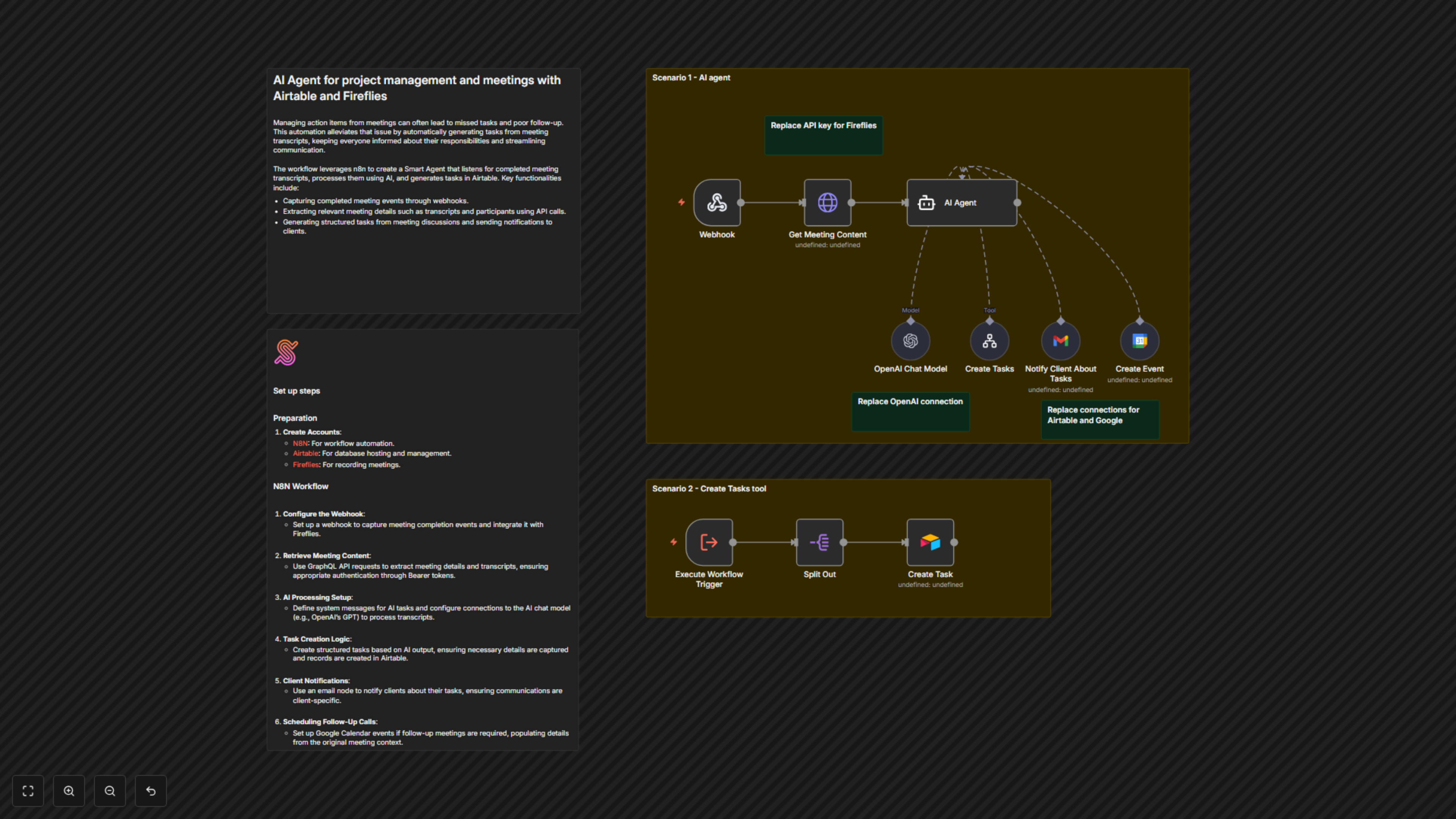
Documentation
AI Meeting Assistant with Fireflies & Airtable
This powerful n8n workflow transforms raw meeting transcripts into actionable tasks, personalized client communications, and scheduled follow-up events. Designed for busy professionals, it eliminates the manual overhead of post-meeting administration, ensuring efficient project progression and client satisfaction.
Key Features
- Automated Task Creation: Instantly generate and assign tasks in Airtable from meeting discussions, ensuring no action item is missed.
- Intelligent Client Notifications: Automatically send personalized meeting summaries and specific action items to clients via Gmail.
- Smart Meeting Scheduling: Proactively identify and schedule follow-up calls in Google Calendar when a new meeting is required.
- AI-Powered Transcript Analysis: Leverages OpenAI's GPT-4o to accurately understand meeting context and identify critical information.
- Seamless Fireflies Integration: Automatically ingests meeting transcripts as soon as they are completed.
How It Works
1. **Meeting Completion Trigger:** The workflow activates instantly when Fireflies finishes transcribing a meeting and sends a webhook to n8n. 2. **Transcript Retrieval:** n8n retrieves the full meeting transcript, participants, and bulleted summary from Fireflies using its GraphQL API. 3. **AI Agent Analysis:** An intelligent AI Agent, powered by OpenAI's GPT-4o via LangChain, meticulously analyzes the transcript. It's programmed to identify action items specifically for you (the workflow owner), determine client-specific responsibilities, and detect if a new follow-up call needs to be scheduled. 4. **Automated Task Creation:** If the AI determines the meeting title relates to a 'project', it triggers the 'Create Tasks' tool (a sub-workflow). This sub-workflow then processes the extracted action items and creates individual, detailed tasks in your designated Airtable base. 5. **Personalized Client Notification:** The AI agent utilizes the 'Notify Client About Tasks' tool to compose and send a tailored email via Gmail. This email includes a meeting summary and lists only the action items pertinent to that specific participant, ensuring clear communication. 6. **Proactive Follow-up Scheduling:** Should the AI identify a need for a subsequent call based on the transcript, it employs the 'Create Event' tool to schedule a Google Meet event in your Google Calendar, automatically inviting the relevant client.